

How to tell which side a voice is coming from at a busy table
Hearing loss makes locating a voice harder, most of all in a noisy room. What studies found, seating tips, and how Captio AI shows the side.
 Nate from Captio AI5 min read
Short answer
To tell which side a voice is coming from at a busy table with hearing loss, sit where you can see every face, ask people to take turns, and use captions that show direction. A 2020 study found listeners with hearing loss located a talker less accurately than those with normal hearing, and worse among several [1]. Captio AI, a live captioning app for deaf and hard of hearing people, shows waves on the voice's side on iPhone 16 and later.
15 of 231
listeners in a 2020 localization study had bilateral sensorineural hearing loss; they located the talker less accurately than the 8 with normal hearing
1 person3
talking at a time is what Alberta Health's pages tell groups to aim for
iPhone 165
and later is where Captio AI's Speaker direction works, per its 1.1.4 release notes
On this page
Telling which side a voice comes from is one of the first things that gets harder with hearing loss, and a busy table makes it worse. The practical fix has three parts: sit where you can see faces, ask people to take turns, and add captions that show where each voice is. This guide covers the research behind the problem, the seating habits that help in a restaurant, a family dinner or a team meeting, and how Captio AI, a live captioning app for deaf and hard of hearing people, shows the side of a voice on iPhone.
Why is it hard to locate a voice with hearing loss?
Listeners with hearing loss locate sounds less accurately than listeners with normal hearing, and a crowded room widens the gap. In a 2020 study in the Journal of the Acoustical Society of America, 8 listeners with normal hearing and 15 with bilateral sensorineural hearing loss tried to find a target talker in a simulated reverberant room1. The listeners with hearing loss "were less accurate at locating the target", with more front-back confusions and larger errors, and accuracy among several talkers was lower than in quiet1.
One-sided hearing loss has its own problem. A 2017 paper in Ear and Hearing says that, at a minimum, unilateral hearing loss impairs sound localization, and that the extent of the difficulty has not been fully appreciated by others2. The same study found that people with unilateral loss localized better for sounds on their hearing side than on the other side2.
These are small laboratory studies, and results vary from person to person. They explain a common experience: at a table, you hear that someone spoke but not where to look.
What helps at a restaurant table or a family dinner?
At a restaurant table or a family dinner, three habits help most: seeing faces, taking turns and picking a quieter place. Alberta Health's pages for people who find it hard to communicate say everyone has trouble hearing in groups, especially when more than 1 person talks at the same time, and that it takes more effort to listen in groups3.
- Sit across from people. For restaurants, Alberta Health advises sitting across from your guests instead of beside them3.
- Ask for one voice at a time. The same page suggests asking that only 1 person talks at a time3.
- Avoid the noisy corner. Alberta Health says to try not to sit close to noisy areas like the kitchen, lounge or front door, and to go to restaurants when they are less busy3.
These habits work with or without an app. For the social side of long dinners, see What is dinner table syndrome?.
How does Captio AI show which side a voice comes from?
Captio AI shows small waves at the edge of the captions screen, on the side the current voice comes from, in the colour of that speaker's tag. The feature is called Speaker direction. You lay your iPhone flat on the table, start Live Captions, and a wave grows on the left or right edge while a person is talking6. The colour tells you who, and the side tells you where.
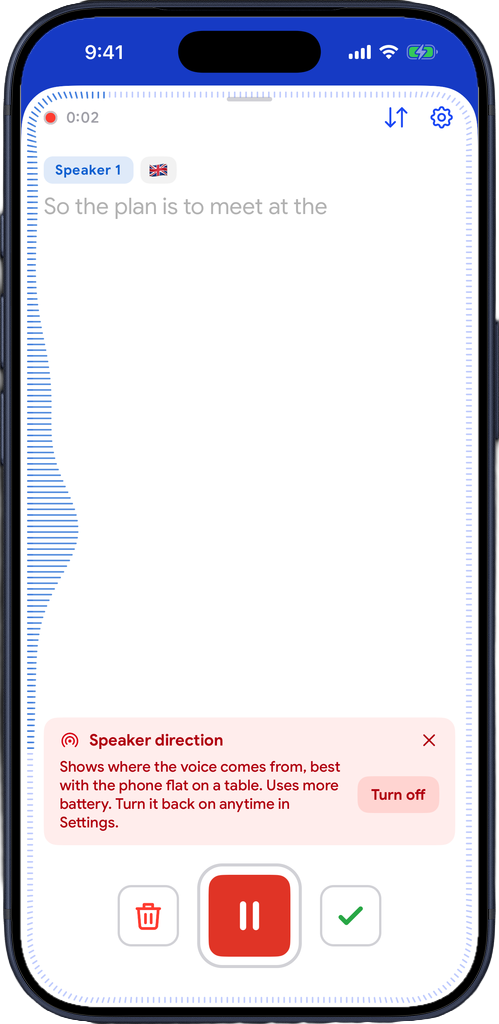
What to know before relying on it:
- Phone: it works on iPhone 16 and later, running iOS 26 or later. Apple's iPhone 16 specifications list Spatial Audio recording among the phone's features4, and Captio AI's 1.1.4 release notes say "on iPhone 16 and later, waves at the edge of the captions show where the voice is coming from"5.
- Not on iPad or Android. On other devices the setting does not appear and captions work as usual.
- Flat on the table. It works best with the phone lying flat.
- Only while words are being written. Room noise alone, such as plates or a coffee machine, does not show waves.
- Battery. It uses a little more battery than captions alone.
- On by default. You can turn it off from the notice in the captions, or in Settings under Captions, Speaker direction.
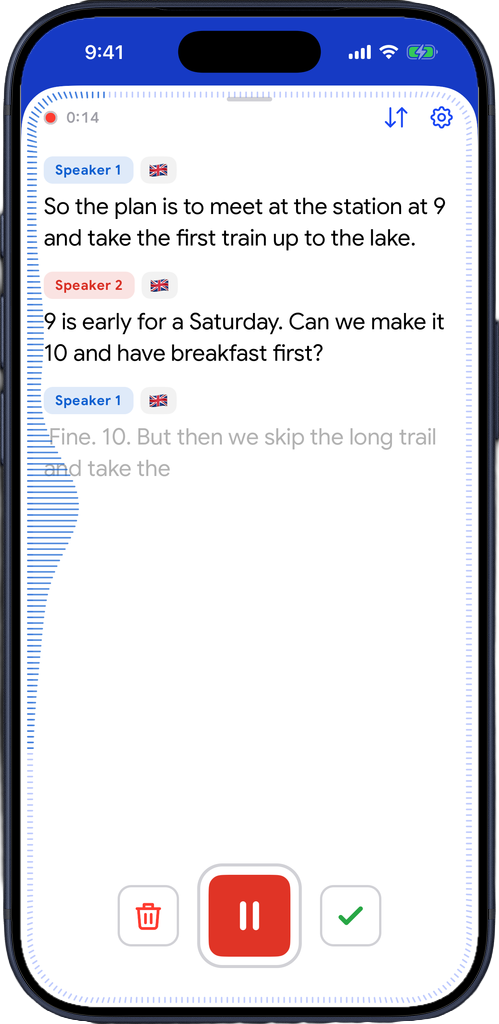
Speaker direction answers "where", and saved voices answer "who". To get names on the tags as well, read How to see who is talking in live captions.
Which situations is it useful in?
Speaker direction is most useful where several people sit around one phone. The table below names the use case and what the waves change. Each use case has its own page on the site.
| Use case | Situation | What the waves add |
|---|---|---|
| Group settings | Family dinner or a night out with friends | You see which side the next line comes from and look there6 |
| Restaurants | A table of 4 in a busy room, phone flat beside the plates | The side of the voice, so you can turn to the person who is speaking6 |
| Meetings | A team meeting around a table, phone in the middle | The side of the voice, and the speaker's colour6 |
Speaker direction is not a replacement for a booked captioner when you are entitled to one, as in a class or a conference. See What is CART captioning?. Live captions also need an internet connection.
What does Speaker direction not do?
Speaker direction does not tell you the exact position of a voice, and it does not work on every phone. It shows the side a voice comes from, not a map of the room. It needs an iPhone 16 or later with the phone's own microphones, and it is not on iPad or Android. The 1.1.4 release notes describe it as waves at the edge of the captions5; nothing more is promised.
If your phone is older, the habits in the section on seating still apply, and Captio AI's captions still separate speakers as Speaker 1, Speaker 2 and so on.
How do I set it up in 3 steps?
- Update Captio AI to the latest version from the App Store, on an iPhone 16 or later5, with iOS 26 or later.
- Lay the phone flat in the middle of the table and start Live Captions.
- Watch the edge of the screen. When someone talks, a wave appears on their side while new words are written.
If you want to switch it off, open Settings, go to Captions and turn off Speaker direction. The first sessions also show a short notice with a Turn off button.

Read what people say, while they say it
Captio AI puts live captions on your phone for conversations, appointments, lectures and meetings, in 60+ languages. Free to start. Private by default.
Frequently asked questions
Why is it hard to tell who is talking at a restaurant table with hearing loss?
At a restaurant table, several voices and room noise arrive at once, and a 2020 study found that listeners with hearing loss located a target talker less accurately in a multitalker background than in quiet, with more front-back confusions [1]. Seeing faces and taking turns helps [3].
Does hearing loss in one ear make it harder to locate a voice?
Yes. A 2017 study in Ear and Hearing says unilateral hearing loss impairs sound localization at a minimum, and that the difficulty has not been fully appreciated by others [2]. Results vary from person to person, so this is general information, not a diagnosis.
Which iPhones show the direction of a voice in Captio AI?
Captio AI's Speaker direction works on iPhone 16 and later, per the 1.1.4 release notes [5]. It is not available on iPad or Android. On other phones, captions work as usual without the waves.
Where should I put my phone at a group dinner in a restaurant?
Lay the phone flat on the table, where it works best according to Captio AI. Sit across from your companions rather than beside them, as Alberta Health suggests [3], so you can also see their faces.
Does Speaker direction show waves for kitchen noise or plates?
No. Captio AI shows the waves only while the captions are writing new words, so room noise alone, such as plates or a coffee machine in a restaurant, does not send you looking around for a voice that is not there.
Can I use direction waves in a team meeting?
Yes, for a meeting held around a table with your phone flat in the middle. The waves take the colour of the speaker's tag, and with saved voices the tag carries the person's name.
Does Speaker direction use more battery?
Yes, a little more than captions alone, per Captio AI. It is on by default and you can turn it off in Settings, under Captions, Speaker direction.
Is Speaker direction free for family gatherings?
Captio AI's Speaker direction is part of Live Captions, with the free plan's 100 free credits a day. Captio AI Plus removes the daily limit.
Sources
- 1Speech detection and localization in a reverberant multitalker environment by normal-hearing and hearing-impaired listenersJournal of the Acoustical Society of America (via PubMed Central), 2020
- 2Unilateral Hearing Loss: Understanding Speech Recognition and Localization VariabilityEar and Hearing (via PubMed Central), 2017
- 3Tips for when it's hard to communicateMyHealth.Alberta.ca, Government of Alberta, 2026
- 4iPhone 16 Technical SpecificationsApple, 2026
- 5Captio AI: Live Captions & TranscriptionApple App Store, 2026
- 6Speaker DirectionCaptio AI, 2026
Written by Nate from Captio AI. Published 2 November 2026. Every figure on this page links to its source. Spotted a mistake? hello@captioai.app