

How to follow a conversation that switches between languages
In the US, 78.3% of people speak only English at home [1]. How to caption a talk that mixes English and Spanish, with flags, language hints and fixes.
 Nate from Captio AI6 min read
Short answer
To caption a conversation that switches between two languages, use a captioning app that handles mixed speech and tell it which languages to expect. Captio AI, a live captioning app for deaf and hard of hearing people, supports speech that switches languages mid-sentence. On iPhone it adds a flag to each speaker tag and lets you fix a recording's language afterwards [5]. Google Live Transcribe offers one primary and one secondary language [2].
21.7%1
of people aged 5 and older in the US did not speak only English at home, 2018-2022 (100% minus 78.3%)
61.1%1
of those who spoke another language at home in the US spoke Spanish, 2018-2022
22
languages Google Live Transcribe lets you set: a primary and one secondary language
On this page
- How common are conversations in more than one language?
- Is switching languages a sign of weak language skills?
- What does it take to caption a conversation in two languages?
- How do you set up captions for a family dinner in English and Spanish?
- How do you follow everyday conversations when people mix languages?
- What about travelling to a country where you do not speak the language?
- What do you do when the captions use the wrong language?
- Which tool should you use for which situation?
Plenty of conversations do not stay in one language. A grandmother switches to Spanish for the punchline, a cousin answers in English, and a deaf or hard of hearing person at the table loses the thread twice. Captions can fix that, but only if they cope with the switch. This guide shows how to set up live captions for a conversation in two languages, using English and Spanish as the example, and what to do when the captions pick the wrong language.
How common are conversations in more than one language?
In the US, 21.7% of people aged 5 and older did not speak only English at home in 2018-2022, because 78.3% did1. Spanish was the most spoken of those other languages: 61.1% of people who spoke a language other than English at home spoke Spanish1. The same US Census Bureau release says 61.0% of Spanish speakers spoke English "very well"1.
Read together, those numbers describe a large group of homes, classrooms and workplaces where English and Spanish sit side by side, and where roughly 4 in 10 Spanish speakers rate their English below "very well"1. For a deaf or hard of hearing person in a US family like that, a single-language caption setting is a poor fit. (The 21.7% is our subtraction from the 78.3% the Census Bureau reports.)
Is switching languages a sign of weak language skills?
No. The Cambridge Handbook of Linguistic Code-switching defines code-switching as the ability of bilinguals to alternate between their two languages3. It adds that code-switching is "not indicative either of the bilingual's inability to separate his languages or of a lack of proficiency"3.
For captions this means the switch is normal speech, not an error to be smoothed over. A tool that works for a bilingual family has to show the Spanish as Spanish and the English as English.
What does it take to caption a conversation in two languages?
Captioning a mixed English and Spanish conversation takes three things: an app that handles more than one language, a way to tell it which languages to expect, and a way to correct it afterwards. The table compares what two tools state on their own pages, as of October 2026.
| Captio AI | Google Live Transcribe | |
|---|---|---|
| Platforms | iPhone and Android | Android; preinstalled on Pixel phones and some other Android phones2 |
| Two languages | 60 languages, including speech that switches languages mid-sentence | One primary and one optional secondary language2 |
| How you switch | You can add expected languages to language hints; each speaker tag shows a language flag | Tap the language name at the bottom of the screen2 |
| Fix the language after | Tap the flag in a saved recording and write it again (iPhone) | Not stated on the help page |
| Offline | Records without internet and transcribes later; live captions need internet | Several languages can be downloaded on Pixel phones with Android 12 or later2 |
The Captio AI cells for languages, language hints, flags and re-writing come from the app's own fact sheet and the App Store release notes, which say of version 1.1.3: "Every speaker tag shows the language as a flag. Tap it in a recording to set the right language."5 Apple's own accessibility page says Live Captions on iPhone, iPad and Mac "can even capture and caption live, in-person speech through the microphone in your device", but it does not list the languages, and says some features "may not be available in all regions or all languages"4. Check Apple's availability page for your language before relying on it.
Google Live Transcribe is the better fit if you are on Android and need two languages at once with a quick tap between them, and it can run several downloaded languages offline on supported devices2. Captio AI is the better fit if you want a flag on each speaker tag and a way to fix the language of a saved recording.
How do you set up captions for a family dinner in English and Spanish?
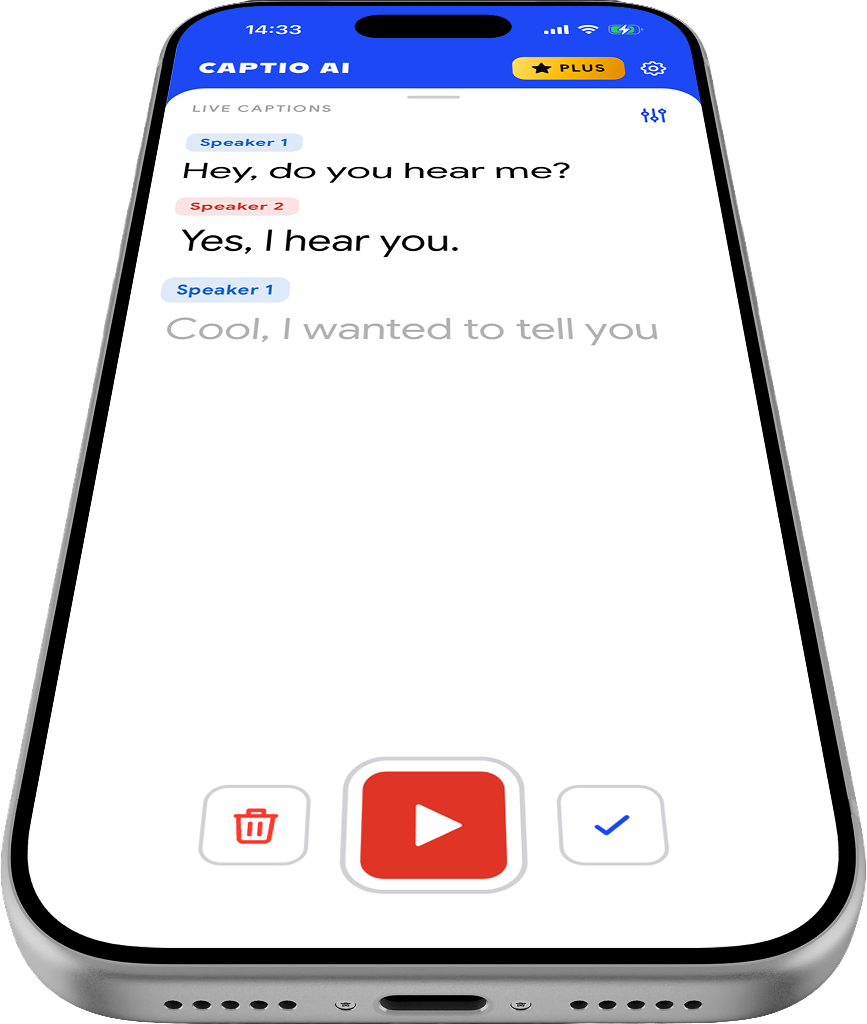
For a family dinner in English and Spanish, put the phone on the table, add both languages to Language hints, and start Live Captions. A language hint tells Captio AI which language to expect, so it starts tuned in from the first word.
- Add English and Spanish to Language hints.
- Turn on Separate Speakers so each person gets a tag.
- Put the phone flat on the table, within reach of everyone who talks. A phone in a pocket hears muffled speech.
- Start Live Captions. On iPhone from version 1.1.3, each speaker tag also shows the flag of the language being spoken, so you can see when a cousin moves from English to Spanish.
- Afterwards, give the speakers names. See how to see who is talking in live captions for how names and tags work.
This works for group settings of any size. If the family speaks Spanish, the Spanish page lists the dialects Captio AI covers, and group settings in Spanish answers questions specific to a Spanish-speaking table.
How do you follow everyday conversations when people mix languages?
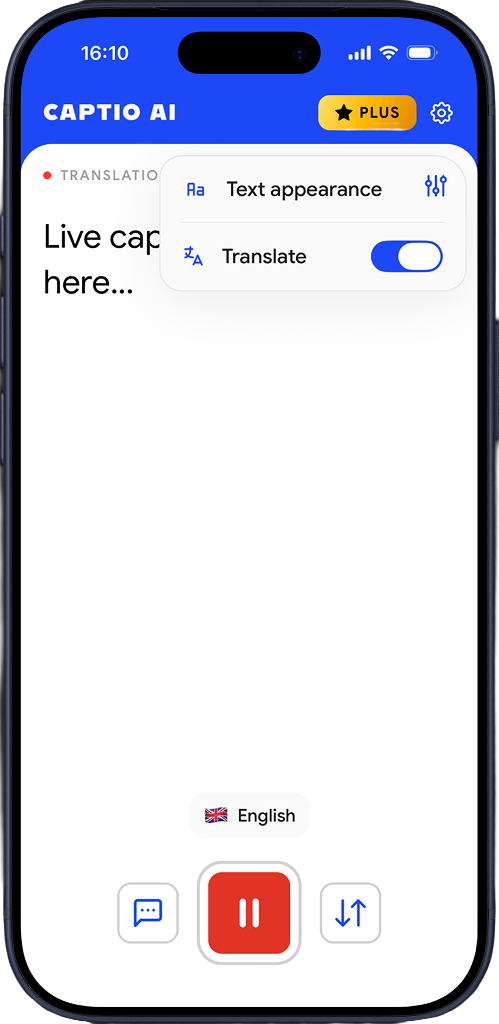
In everyday conversations, such as a shop counter, a neighbour at the door or a work break, the same setup applies with one change: you do not know in advance which language the other person will use. Add every language you meet on a normal week to Language hints, and keep Live Captions one tap away. A widget on the iPhone Home Screen starts Live Captions or translation without opening the app first. See live captions for everyday conversations for more situations.
If you also need the other person's words in your own language, switch on Live Translator. It shows the translation next to the original captions. Captio AI's App Store listing describes a two-way mode in which "each person sees the other side in their own language"5.
What about travelling to a country where you do not speak the language?
When travelling, the other person usually speaks one language and you read another. Live Translator covers 60+ languages5 and translates speech into the language you pick, shown beside the original captions. For a trip, there are three things to do before you leave:
- Add the language you expect to Language hints.
- Check your connection plan. Live captions and live translation need internet; without it the app records and transcribes when the phone reconnects.
- Know the free limit: the free plan gives 100 free credits a day, as of October 2026.
See live captions for travelling and, for a Spanish-speaking country, travelling in Spanish.
What do you do when the captions use the wrong language?
If Captio AI writes a recording in the wrong language, tap the language flag on the speaker tag in the saved recording, choose the right language and write the recording again. This is available on iPhone from version 1.1.35. Do this when a conversation started in a language you did not expect.
Two follow-up habits help. First, add the corrected language to your Language hints so the next session starts in it. Second, use Words and names to add names, places and specialist terms that appear in both languages, such as a relative's name or a medical term. When an uncertain word is underlined, long-press it to correct it everywhere in the recording.
Which tool should you use for which situation?
| Situation | A good choice | Why |
|---|---|---|
| Android phone, two languages, a quick tap between them | Google Live Transcribe | Primary and secondary language; tap to switch2 |
| Family dinner in English and Spanish, you want to see who spoke which language | Captio AI on iPhone | Flag on each speaker tag |
| Lecture or meeting recorded in two languages, fix it later | Captio AI on iPhone | Set the recording's language and write it again |
| Travelling, you need the other person's words in your language | Captio AI Live Translator | Translation next to the original captions |
| iPhone or iPad, built-in captions | Apple Live Captions | Built in; check the language list for your language4 |
No captioning app replaces a sign language interpreter or a human captioner when you have a legal right to one. For people who sign, or for a medical or legal setting, ask the organisation what access it provides. This is information, not legal advice.

Read what people say, while they say it
Captio AI puts live captions on your phone for conversations, appointments, lectures and meetings, in 60+ languages. Free to start. Private by default.
Frequently asked questions
Can live captions handle Spanish and English in the same sentence?
Captio AI lists speech that switches languages mid-sentence among its 60 languages, including English and Spanish. Results depend on the audio: a quiet table works better than a loud one. If a recording comes out in the wrong language, you can set the language and write it again.
How do I caption a family dinner where some people speak Spanish and others English?
Put the phone on the table with Live Captions running and the languages you expect added as language hints. In Captio AI on iPhone each speaker tag shows a flag for the language being spoken, so you can see who switched to Spanish and when. Add speaker names afterwards if you want them.
Does Google Live Transcribe work with two languages at once?
It lets you choose a primary language and one optional secondary language, and you switch between them by tapping the language name at the bottom of the screen [2]. That is a manual switch between two languages, not a statement that it follows a mixed sentence.
What should I do when captions come out in the wrong language during travel?
In Captio AI on iPhone, open the saved recording, tap the language flag, choose the right language and write the recording again. For the next conversation, add that language to your language hints so captions start tuned to it.
Do I need an internet connection to caption a mixed-language conversation while travelling?
For live captions and live translation in Captio AI, yes. Without a connection the app can still record, and it transcribes the recording when the phone is back online. Plan for this before a trip to a place with patchy coverage.
Is switching between languages a sign that someone has weak language skills?
No. The Cambridge Handbook of Linguistic Code-switching says switching is not indicative of an inability to separate the languages or of a lack of proficiency [3]. That matters in a group conversation: captions should follow people, not correct them.
Are language flags in Captio AI available on Android?
Language flags on speaker tags are listed for iPhone, from version 1.1.3. Android availability is not confirmed, so check the Google Play listing before you rely on them.
Sources
- 1Most Americans Speak Only English at Home or Speak English 'Very Well'US Census Bureau, 2023
- 2Use Live TranscribeAndroid Accessibility Help, Google, 2026
- 3Themes in the study of code-switching (Chapter 1, The Cambridge Handbook of Linguistic Code-switching)Cambridge University Press, 2009
- 4Hearing: accessibility featuresApple, 2026
- 5Captio AI: Live Captions & TranscriptionApple App Store, 2026
Written by Nate from Captio AI. Published 29 October 2026. Every figure on this page links to its source. Spotted a mistake? hello@captioai.app