

Live captions and productivity tool for deaf and HoH people.
Follow any conversation, meeting or lecture. In any language.
Free on iPhone, Android and the web


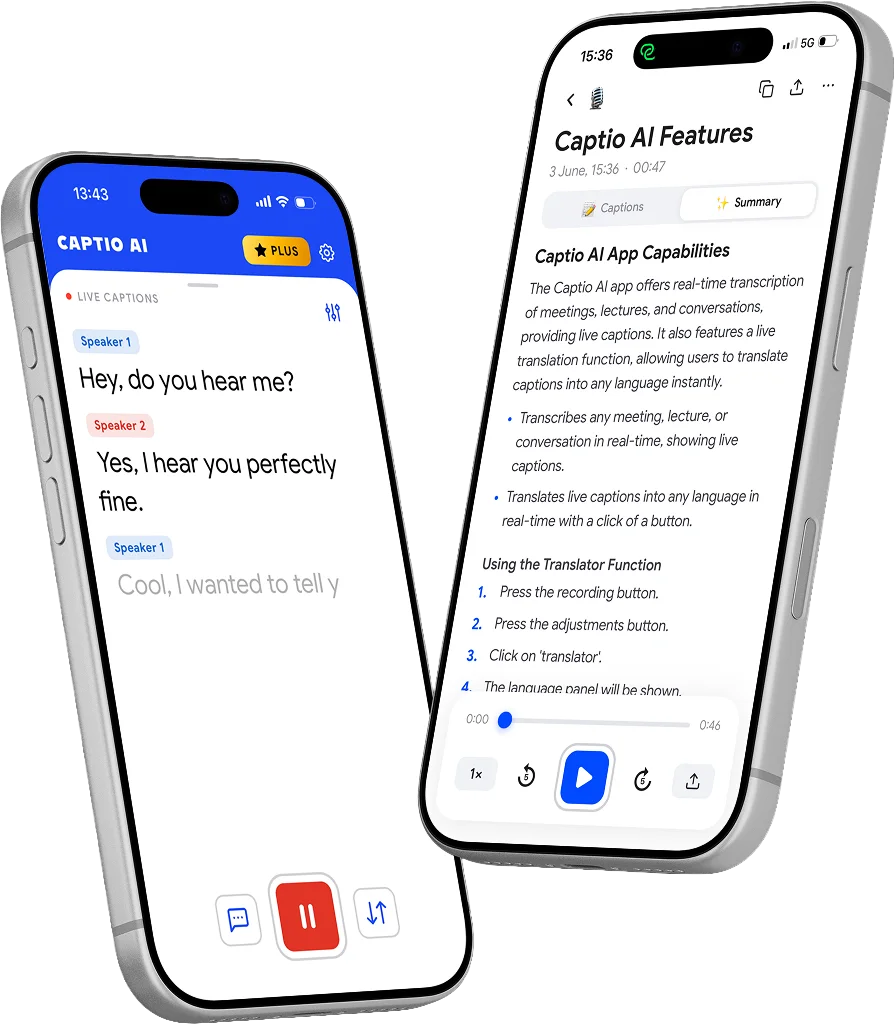
Everything you need to follow any conversation
Four tools built specifically for deaf and hard of hearing people.
Real-Time Speech to Text
- Word by word, in real time
- Works in noisy places
- Any accent, any pace
- No lip reading needed
Translate Any Language in Real Time
- Translates as they speak
- Each person speaks their own language
- Handles mid-sentence switches
- 60+ languages
Transcribe Any Audio or Video File
- Any audio or video file
- Organized by speaker
- 60+ languages
- Read, copy, search, share
Turn Transcripts into Structured Summaries
- Key points and decisions
- Action items extracted
- Works on any transcript
- Organized into sections
More features
Works in every situation
Designed for the real moments that matter — not just quiet controlled environments.
Most conversations happen fast, at normal pace, without warning. Captio AI captions every word as it's spoken, so you can follow without asking anyone to repeat themselves.
🤟Communicating with Deaf & HoHHearing people often don't know how to adapt when talking with deaf or hard of hearing friends. Captio AI turns their speech into real-time captions, so the conversation can happen naturally on both sides.
💼MeetingsIn meetings, decisions happen fast and people talk over each other. Captio AI captions every speaker as they talk, so you never miss a decision or a question directed at you.
🎓LecturesLecturers speak quickly, cover complex material, and rarely repeat themselves. Captio AI gives you a live transcript of everything said, so you can follow the content instead of straining to hear it.
🏥Doctor AppointmentsDoctors speak quickly and use clinical language that's easy to mishear. Captio AI shows you everything they say in real time, so you can follow your diagnosis and ask the right questions.
🤝Job InterviewsMissing a question in an interview means answering wrong or asking for a repeat. Captio AI shows you every word the interviewer says, so you can focus entirely on your answer.
📱Phone & Video CallsPhone and video calls are harder to follow than in-person conversations. No lip reading, often poor audio quality. Captio AI captions whoever is speaking in real time, so you do not need to ask for repeats.
👥Group SettingsIn groups, multiple people talk at once and the conversation moves fast. Captio AI keeps up with whoever is speaking, so you can follow without losing where the conversation is going.
🍽️Restaurants & CafesBackground noise makes speech hard to follow even for people without hearing loss. Captio AI focuses on whoever is speaking to you, so you can have a real conversation through the noise.
✈️TravelingIn airports, hotels, and unfamiliar cities there is no margin for mishearing. Captio AI captions speech in 60+ languages, so you can navigate confidently wherever you go.
🎤Conferences & EventsSpeakers are far away, acoustics are unpredictable, and you cannot ask for a repeat. Captio AI gives you a live transcript of every speaker, so you can follow the full event from any seat.
📺TV & MediaBuilt-in subtitles are often wrong, delayed, or missing entirely. Captio AI captions whatever is playing in real time, so you are not dependent on whether the content has subtitles.
Free on iPhone, Android and the web
Captio AI supports 60+ languages
Free on iPhone, Android and the web
What you hear stays with you.
Audio stays off our servers
Your audio is turned into text in real time and never stored on our servers. Recordings you save stay on your phone, and their transcripts sync only to your own account.
Not a product
Your conversations are not something Captio AI sells, shares, or monetizes — to anyone, for any reason.
Not used to train anything
What you say in a doctor's appointment or a job interview never ends up in a training dataset. Not ours. Not anyone else's.

Free on iPhone, Android and the web
Frequently asked questions
Who is Captio AI designed for?
How accurate are the live captions?
Which languages does Captio AI support?
Does Captio AI work with different accents and dialects?
What is the difference between Live Captions and Live Translator?
Does Captio AI store or share my audio?
Does Captio AI work without an internet connection?
What phone or iPad do I need?
Can I use Captio AI at a doctor's appointment?
Can I use Captio AI in meetings and lectures?
What is Audio Transcription and how is it different from Live Captions?
What does the AI Summary feature do?
Is Captio AI free to use?
How is Captio AI different from Apple's built-in Live Captions?
Get started
Captio AI is free to start
Free on iPhone, Android and the web