

How to see a doorbell, alarm or crying baby in live captions
Captio AI 1.1.5 writes sounds like [doorbell rings] into iPhone captions. How it compares with Apple and Android sound alerts, and why smoke alarms need more.
 Nate from Captio AI5 min read
Short answer
To see a doorbell, alarm or crying baby, turn on sound alerts that write or flash the sound on your phone. Captio AI, a live captioning app for deaf and hard of hearing people, shows doorbells, alarms, crying babies, barking dogs, laughter and music in its iPhone captions, like [doorbell rings], and vibrates for alerts since version 1.1.5 [1]. Apple and Google offer built-in alerts too [2][3]. None replaces a smoke alarm made for sleepers [4].
6 sounds1
named in the Captio AI 1.1.5 release notes: doorbell, alarm, crying baby, barking dog, laughter and music
43%4
of people with mild to moderately severe hearing loss were not woken by a standard 3100 Hz smoke alarm tone in a 2007 study
15 sounds2
recognised by Apple's Sound Recognition on iPhone
On this page
If you cannot hear a doorbell, a timer or a baby, you have three kinds of tools: an app that writes the sound into your captions, a phone setting that sends an alert, and a device made for the sound (a doorbell light, a bed shaker). Captio AI, a live captioning app for deaf and hard of hearing people, added the first kind on iPhone in version 1.1.51. This guide shows what each tool does, where each one stops, and which job needs a dedicated device.
What does Captio AI show besides speech?
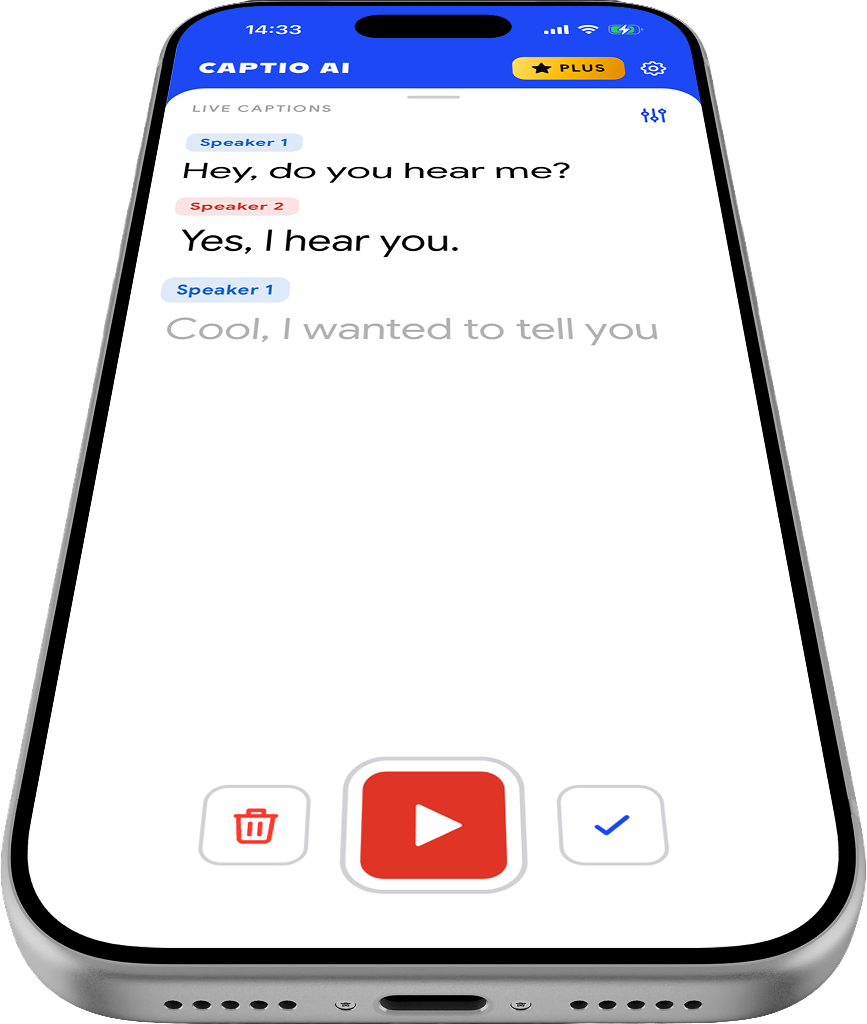
Captio AI 1.1.5 shows a doorbell, an alarm, a crying baby, a barking dog, laughter or music in your captions, written like [doorbell rings]1. Alert sounds make your iPhone vibrate1. You change it in Settings under Recognize sounds1.
That is everything the release notes confirm. They do not give a full list of sounds, and they do not say the app listens when captions are off. Plan around what is stated: sounds appear in captions you are already reading.
How do Apple and Android sound alerts compare?
Apple's Sound Recognition and Android's Sound Notifications alert you to sounds around you without captions, while Captio AI puts sounds inside the captions of a conversation. The table compares what each company states on its own page.
| Captio AI (iPhone, 1.1.5) | Apple Sound Recognition (iPhone) | Android Sound Notifications | |
|---|---|---|---|
| Where you see it | In the captions, like [doorbell rings]1 | A notification2 | Vibrate or camera flash3 |
| Sounds named | Doorbell, alarm, crying baby, barking dog, laughter, music1 | "15 different sounds", including sirens, horns and crying babies2 | Smoke and fire alarms, sirens, baby sounds, dog barking, knocking, doorbell, appliance beeping, landline ringing, water running3 |
| Alert | Phone vibrates for alerts1 | Notification2 | Vibrate or flash3 |
| Custom sounds | Not stated | Yes, sounds unique to your environment2 | Not stated |
| Where it runs | iPhone1 | iPhone and other Apple devices2 | Pixel and some phones; others via an app3 |
Apple and Google are better when you want an alert with no captions running: Apple's page says Sound Recognition "listens for certain sounds" and uses on-device intelligence to notify you2, and Google says Sound Notifications are always listening, which can use more battery3. Captio AI puts the sound in the same place as the words, which suits you when you are already following a conversation.
How do I use sound captions at home, at dinner or in a lecture?
Captio AI's sound captions fit three everyday situations, and each one uses the same step: start Live Captions and keep the phone where it hears the room.
- At home, everyday conversations: a doorbell or an alarm shows next to what your family says, so you know why everyone stopped talking. See everyday conversations.
- At a family dinner or a group setting: laughter and music show in the captions, so you know a joke landed or that music is why the table is hard to follow. See group settings.
- In a lecture or a meeting: laughter shows in the captions as a sound, so you know the room laughed even when the words before it were hard to follow. See lectures and meetings.
- In a restaurant: when music plays, it can show as a sound in the captions next to the words you can follow, which explains why the table is hard to hear. See restaurants.
Start with Live Captions and check Settings, Recognize sounds. Google advises placing the phone in the middle of the room, unobstructed, for its own alerts3; the same sense applies to any phone that has to hear the room.
Can a phone alert replace a smoke alarm for a deaf person?
No. A phone alert cannot replace a smoke alarm made for deaf and hard of hearing people, and Apple says not to rely on Sound Recognition in circumstances where you may be harmed or injured, or in high-risk or emergency situations2.
The reason comes from research. A 2007 study by Dorothy Bruck and Ian Thomas of Victoria University in Australia found that the standard 3100 Hz smoke alarm tone failed to wake 43% of people with mild to moderately severe hearing loss, even though they could hear it while awake4. Strobe lights woke only 27% of the hard of hearing participants, while a 520 Hz square wave woke 92% at 75 dBA and 100% at 95 dBA4. For deaf and hard of hearing sleepers, that points to a loud low-frequency alarm or a bed shaker connected to the detector, which your local fire service can advise on. This is information, not safety advice for your home.
Which tool should you use?
Use the tool that matches the moment, and keep a made-for-purpose device for anything that could hurt you.
| Situation | Better choice |
|---|---|
| Following a conversation at home and you want the doorbell in the captions | Captio AI sound captions1 |
| An alert with no captions running, on an iPhone | Apple Sound Recognition2 |
| An alert with vibration or flash on Android | Android Sound Notifications3 |
| Fire or smoke while you sleep | A smoke alarm with a low-frequency signal or bed shaker, not a phone app24 |
Captio AI is for in-person speech and the sounds around it. It does not caption phone calls.
What is not confirmed yet?
Captio AI's release notes name six sounds and vibration for alerts, nothing more1. Android availability of sound captions is not confirmed, so this guide says iPhone only. Accuracy figures are not published, so test the doorbell, the alarm and the baby sound yourself, in your own home, before you depend on them.

Read what people say, while they say it
Captio AI puts live captions on your phone for conversations, appointments, lectures and meetings, in 60+ languages. Free to start. Private by default.
Frequently asked questions
Does Captio AI show a doorbell at home on iPhone?
Captio AI version 1.1.5 shows a doorbell in the captions as text, like [doorbell rings], and makes the phone vibrate for alerts [1]. The release notes describe sounds shown in captions. They do not describe listening in the background, so do not treat it as a replacement for a doorbell light.
Can a deaf person rely on a phone app to hear a smoke alarm at night?
No. Apple tells people not to rely on Sound Recognition where they may be harmed or in emergencies [2]. In a 2007 study a standard smoke alarm tone failed to wake 43% of people with mild to moderately severe hearing loss [4]. Use alarms designed for sleepers, and ask your local fire service.
How do I get doorbell alerts on an Android phone?
Android's Sound Notifications lists doorbell ringing, knocking and baby sounds, and can vibrate or flash the camera light [3]. It is preinstalled on Pixel phones and some others. On other phones it comes with the Live Transcribe and Notifications app from Google Play [3].
Does Captio AI recognise a crying baby on a phone at a family dinner?
Captio AI 1.1.5 lists a crying baby among the sounds that show in its iPhone captions [1]. At a family dinner the sound appears in the captions next to what people say. The release notes do not give accuracy figures, so check it with your own baby's sounds.
Does Sound Recognition on iPhone work in every language and country?
Not necessarily. Apple says some features may not be available in all regions or languages, and points to its availability list for Sound and Name Recognition [2]. Check the list for your country before you rely on it.
Do captions in a lecture or a restaurant show laughter and music?
In Captio AI 1.1.5, laughter and music are among the sounds that show in the captions [1]. In a lecture hall that can mark when a room laughs. In a restaurant it can show that music is playing, which explains why a conversation is hard to follow.
Where do I change sound captions in Captio AI?
The release notes say you change it in Settings under Recognize sounds [1]. They do not say which options that screen holds, so open it on your iPhone to see what you can change.
Sources
- 1Captio AI: Live Captions & Transcription (version 1.1.5 release notes)Apple App Store, 2026
- 2Accessibility: Hearing features, Sound & Name RecognitionApple, 2026
- 3Sound Notifications: Get notified about important sounds around youGoogle Accessibility Help, 2026
- 4Current smoke alarms unable to wake millions of hard of hearing (Bruck and Thomas, Victoria University)The Hearing Review, 2007
Written by Nate from Captio AI. Published 30 October 2026. Every figure on this page links to its source. Spotted a mistake? hello@captioai.app