

How to ask Claude or ChatGPT about your meeting recordings
Add the Captio AI connector to Claude, ChatGPT, Gemini or Perplexity and ask who said what in a meeting. Setup steps and limits from each chat app's own page.
 Nate from Captio AI7 min read
Short answer
To ask Claude or another chat app about your meeting recordings, add the Captio AI connector address, https://captioai.app/mcp, as a custom connector, sign in with your Captio AI account and tap Allow. Connectors arrived in Captio AI 1.1.4 [1]. ChatGPT adds it under Plugins with OAuth sign-in [7]. Claude allows one custom connector on its free plan [2]. Gemini needs a personal Google account, age 18 or over, in the US and in English [3].
1.1.41
the Captio AI version that added Connectors for Claude, ChatGPT, Gemini and Perplexity
1 connector2
custom connectors a free Claude plan can have
18+, US, English3
what Gemini requires before you can add a custom app
On this page
- What does the Captio AI connector let a chat app do?
- How do you add Captio AI to Claude?
- How do you add Captio AI to ChatGPT?
- What does Gemini require before you can add Captio AI?
- What does Perplexity say about custom connectors?
- The four chat apps side by side
- What can you ask about a meeting, a lecture or a conference?
- Does this replace access arrangements at work or school?
- What comes before the questions: live captions and uploads?
A one-hour meeting leaves a transcript of thousands of words, and the part you need is a single sentence: the date the launch moved to, the number someone quoted, who agreed to what. Captio AI, a live captioning app for deaf and hard of hearing people, lets you ask a chat app for that sentence. Its release notes for version 1.1.4 say: "Connectors: ask Claude, ChatGPT, Gemini or Perplexity about your recordings. Settings → Connectors shows how."1
This guide covers what the connector does, how to add it to each chat app, and the plan and region rules each chat app sets for itself, as of November 2026.
What does the Captio AI connector let a chat app do?
The Captio AI connector lets a chat app search and read the recordings in your Captio AI account, with who said what and when. It is read-only. It finds where something was discussed by meaning, across languages, and it also finds exact words such as names and numbers.
It reads your own recordings and every recording in the shared folders you are in, never a colleague's other recordings. The shared-folder rules are in how to organize and share meeting transcripts in folders. Because the connector reads what is synced to your account, you need a Captio AI account, which you create by signing in with Apple or Google.
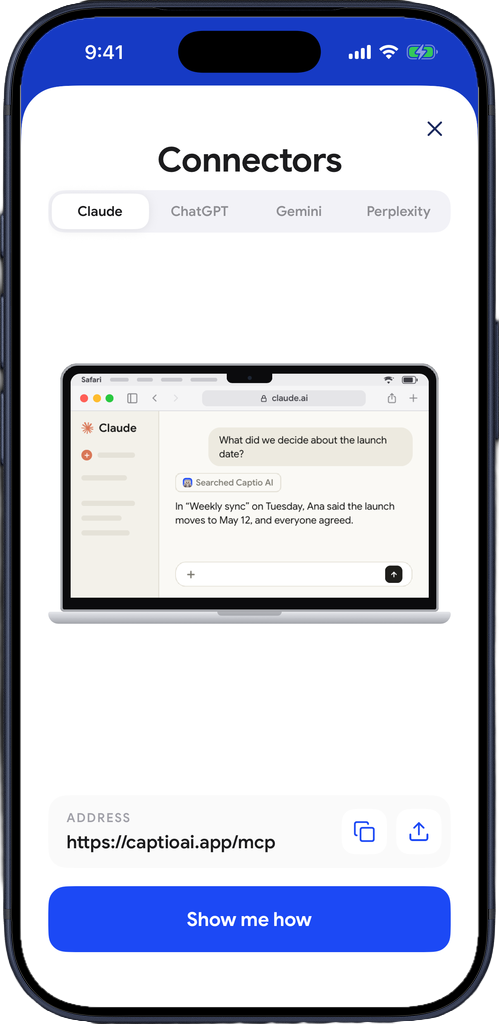
The address you add is https://captioai.app/mcp. It works through MCP, the Model Context Protocol, which its maintainers describe as "an open-source standard for connecting AI applications to external systems"5. The Captio AI connector is one of many MCP connectors a chat app can have, and the Captio AI app lists the steps for each chat app in Settings, Connectors.
How do you add Captio AI to Claude?
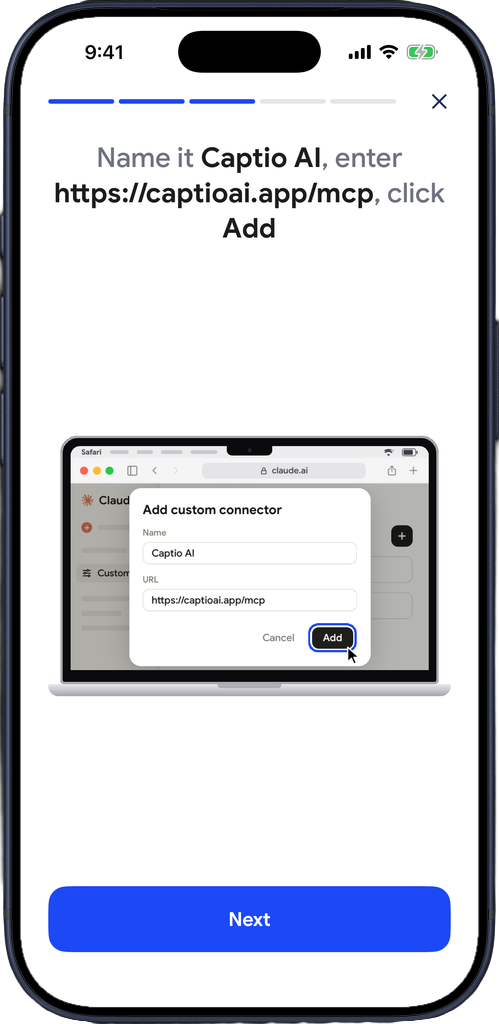
You add Captio AI to Claude as a custom connector. According to Anthropic's help page, the steps for a Pro or Max plan are [2]:
- Go to Customize, then Connectors.
- Click "+ Add," then "Add custom connector."
- Enter a name, such as Captio AI.
- Enter the remote MCP server URL,
https://captioai.app/mcp, and continue. - Review the detected authentication settings and continue, choose how people sign in, and click Add2.
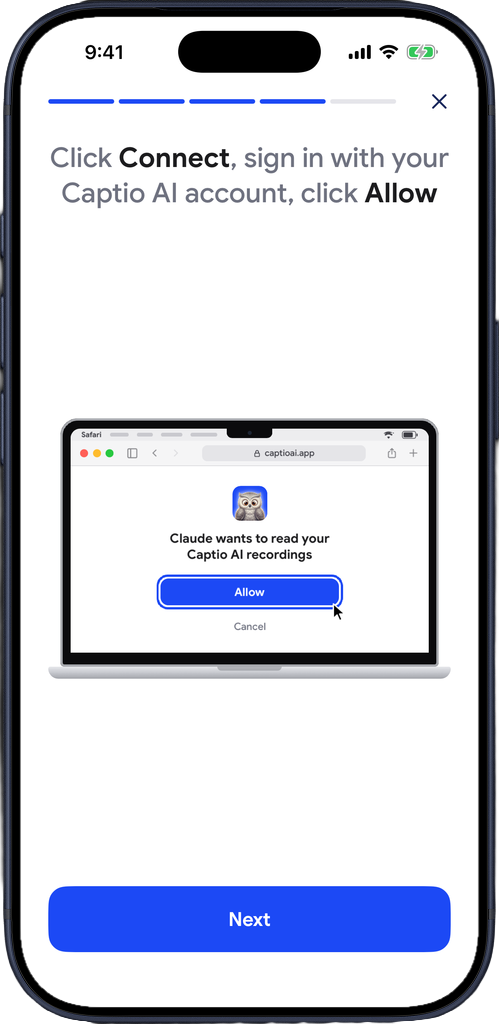
Then sign in with your Captio AI account on captioai.app and click Allow; on Team and Enterprise plans members click Connect first2. To use it in a conversation, click the "+" button at the lower left of the chat and choose Connectors, where each connector has a toggle2.
The plan rules matter if you are a student or work alone. Anthropic says custom connectors are available on the Free, Pro, Max, Ultra, Team and Enterprise plans, and that "Free users are limited to one custom connector"2. On a Team plan only Owners and Primary Owners can add one, and members then click Connect themselves2. A team that records its weekly meetings into one shared folder needs an owner to add the connector once, and each person then signs in with their own Captio AI account.
How do you add Captio AI to ChatGPT?
You add Captio AI to ChatGPT as a custom MCP server in Plugins. OpenAI's developer page says to go to ChatGPT Plugins, select the plus button, then Add custom MCP server, enter the server URL and authentication details, review the risk warning, select "I understand and want to continue," then Create as a plugin7. Use https://captioai.app/mcp as the URL and OAuth as the authentication, then install the plugin and test it in a chat7.
OpenAI's page says users "will get an OAuth flow to your service"7, which here means signing in with your Captio AI account and clicking Allow. The ChatGPT plans that can add custom connectors are the part to check in the app: the page above does not list them, and OpenAI's help article on developer mode and MCP apps refused automated access when this article was checked. Settings, Connectors in Captio AI shows the current steps on your phone.
What does Gemini require before you can add Captio AI?
Gemini only accepts Captio AI as a custom app for some people. Google's help page says you must be 18 or over and in the US, you need a personal Google account because "this feature isn't available if you sign in with a work or school Google Account," and Keep Activity must be on3. Custom apps are only available in English, and you can only connect them in the Gemini web app, even though they work on mobile after setup3.
The path is Settings, then Connected Apps (look under Personal Intelligence first if you do not see it), then the option to add a custom app. Enter https://captioai.app/mcp, continue and follow the on-screen instructions3. A student in Germany or a teacher in the UK cannot use this route today, according to those rules. Claude and Perplexity do not state a country limit on the pages used here.
What does Perplexity say about custom connectors?
Perplexity's help page says "To add a remote MCP connector, open Plugins in the sidebar and select Add custom"4. The page does not state which plans can do this, and it does not describe the sign-in steps beyond saying that remote servers "require remote authentication"4. Check your plan in Perplexity before you plan around it.
The four chat apps side by side
| Claude | ChatGPT | Gemini | Perplexity | |
|---|---|---|---|---|
| Where you add it | Customize, Connectors2 | Plugins, Add custom MCP server7 | Settings, Connected Apps, on the web3 | Plugins, Add custom4 |
| Free plan | Yes, one custom connector2 | Not stated7 | Not stated; needs a personal account3 | Not stated4 |
| Country | Not stated2 | Not stated7 | US only3 | Not stated4 |
| Language | Not stated2 | Not stated7 | English only3 | Not stated4 |
| Work or school accounts | Team and Enterprise owners add it2 | Not stated7 | Not available3 | Not stated4 |
"Not stated" means the page used here does not say, not that there is no limit. Each chat app changes its menus, so treat the table as a snapshot from November 2026.
What can you ask about a meeting, a lecture or a conference?
You ask about what was said, and name the situation so the chat app searches the right recordings. These questions fit the settings where Captio AI is used:
- Meetings: "What did we decide about the launch date in the weekly sync, and who agreed?" The connector can return the passage with the speaker and the time. See captions for meetings.
- Lectures: "Where did the lecturer explain the exam format?" A student who missed a line can find the passage by meaning instead of rereading an hour. See captions for lectures.
- Conferences: "Which talks mentioned captioning budgets?" Recordings from a conference day can sit in one folder, and the connector searches across them. See captions for conferences.
- Group settings: "What did Mum say about the family dinner on Saturday?" Names show when you saved the voice of the person speaking. See captions for group settings.
For exact words, ask for them: a name, a figure or a quoted phrase. For a wide question, ask for the passage by meaning. If an answer looks off, ask the chat app to read the transcript around that moment and check it yourself.
Does this replace access arrangements at work or school?
No. A transcript you can search is a tool, not an accommodation. ADA.gov says the goal of effective communication is that "communication with people with these disabilities is equally effective as communication with people without disabilities," and lists real-time captioning among the aids6. Captio AI is one tool among them, and it does not replace interpreters or the accommodations you are entitled to. This is general information, not legal advice. Ask your employer or school what they provide, and tell everyone in the room before you record. The US consent rules are in the folders guide.
What comes before the questions: live captions and uploads?
The questions come after the meeting. During it, Live Captions puts the words on your screen as people speak, and Audio Transcription turns a file you upload into a transcript. To see who is talking during the meeting, see how to see who is talking in live captions. The connector only reads what is already saved to your account.

Read what people say, while they say it
Captio AI puts live captions on your phone for conversations, appointments, lectures and meetings, in 60+ languages. Free to start. Private by default.
Frequently asked questions
Can Claude read my meeting recordings from Captio AI?
Yes, once you add the connector. In Claude you add a custom connector with the address https://captioai.app/mcp, sign in with your Captio AI account and allow access. Claude can then search and read your own recordings and the recordings in shared folders you are in. It is read-only.
Do I need a paid Claude plan to ask about my lecture recordings?
No. Anthropic's help page says custom connectors are available on the Free, Pro, Max, Ultra, Team and Enterprise plans, and that free users are limited to one custom connector [2]. A student who wants to ask about lecture recordings can use that one connector for Captio AI.
Can a chat app read my colleague's other recordings in a shared team folder?
No. The connector reads your own recordings and every recording in the shared folders you are in. It does not read a colleague's other recordings. If you leave a shared folder, you can no longer read its recordings through the connector.
Can the chat app change or delete my conference recordings?
No. The Captio AI connector is read-only. The chat app can search and read recordings, with who said what and when, but it cannot edit, move or delete them.
Can I ask in English about a meeting spoken in Spanish?
Yes. The connector finds where something was discussed by meaning across languages, so an English question can find a discussion in another language. It can also look for exact words, such as a name or a number.
Does Perplexity or ChatGPT support custom connectors?
Both have a way to add one. Perplexity's help page says to open Plugins in the sidebar and choose Add custom [4]. OpenAI's developer page says to go to ChatGPT Plugins, select the plus button, then Add custom MCP server [7]. Neither page used here lists which plans can do it, so check your plan in the app.
Can I ask in English about a Spanish or Slovenian lecture I recorded?
Yes in Claude, ChatGPT and Perplexity as far as the Captio AI connector goes: it finds passages by meaning across languages, so an English question can find a discussion in Spanish or Slovenian. In Gemini, custom apps are only available in English, so ask in English there [3].
Can a deaf teacher in the UK use the connector with Gemini?
Not today according to Google's help page, which says custom apps need someone aged 18 or over in the US, a personal Google account, Keep Activity on and English [3]. Claude's and Perplexity's pages used here state no country limit, so a teacher in the UK can check those instead.
Sources
- 1Live Captions - Captio AIApple App Store, 2026
- 2Get started with custom connectors using remote MCPAnthropic, Claude Help Center, 2026
- 3Connect & manage custom apps for Gemini AppsGoogle, Gemini Apps Help, 2026
- 4Local and remote MCPs for PerplexityPerplexity Help Center, 2026
- 5What is the Model Context Protocol (MCP)?Model Context Protocol, 2026
- 6Effective communicationADA.gov, US Department of Justice, 2026
- 7Model Context Protocol: connect in ChatGPTOpenAI, developers.openai.com, 2026
Written by Nate from Captio AI. Published 1 November 2026. Every figure on this page links to its source. Spotted a mistake? hello@captioai.app