

Best apps for captioning university lectures in 2026
Otter's free plan stops at 30 minutes per conversation, Ava's free sessions at 40. Six lecture captioning options compared from their own pages, with prices.
 Nate from Captio AI7 min read
Short answer
The best app for captioning a university lecture depends on your phone and how long the lecture runs. Apple's built-in Live Captions captions in-person speech on iPhone [4]. Google Live Transcribe covers Android [6]. Otter's free plan caps conversations at 30 minutes [2], and Ava's free sessions at 40 [8]. Captio AI, a live captioning app for deaf and hard of hearing people, adds saved recordings, summaries and translation. A university's own CART service can be requested separately [1].
30 min2
longest conversation on Otter's free Basic plan, with 300 transcription minutes a month
40 min8
longest captioned session on Ava's free plan
185
language and region variants Apple lists for Live Captions
On this page
- Lecture captioning apps at a glance
- Which app is best for a lecture on an iPhone?
- Which app is best for a lecture on an Android phone?
- How long can a free session last in a lecture?
- What does it cost to caption lectures all term?
- Which app suits which lecture?
- Where are the other apps the better choice?
- Which one should you use?
The best app for captioning a university lecture depends on three things: whether you have an iPhone or an Android phone, how long your lectures run, and whether you want the words afterwards. Apple's built-in Live Captions is the first free thing to try on an iPhone4, Google Live Transcribe is the Android equivalent6, and Otter, Ava and Captio AI add saved transcripts or longer sessions, each with limits on its free plan28. This comparison uses each company's own pages, opened in November 2026.
Captions from any app are a second channel, not a replacement for support your university arranges. The ADA.gov page on effective communication describes real-time captioning (CART) as a typist whose words appear on a screen, useful for people who are deaf or have hearing loss but do not use sign language1. Our CART explainer and our guide to keeping up in university lectures cover how to ask for it.
Lecture captioning apps at a glance
The table puts what the companies state side by side. "Not stated" means the page I opened does not say.
| Apple Live Captions | Google Live Transcribe | Otter | Ava | Captio AI | |
|---|---|---|---|---|---|
| Captions a lecturer in the room | Yes, through the microphone4 | Yes, through the microphone6 | Real-time transcription of lectures3 | Yes, with a computer and a Bluetooth microphone recommended9 | Yes, live captions of speech around you11 |
| Platforms | iPhone, iPad, Mac, Apple Watch, Apple Vision Pro4 | Android, preinstalled on Pixel6 | iPhone, iPad, Android, web23 | Mobile, web, desktop8 | iPhone, iPad, Apple Watch11, Android |
| Free plan | Built in; price not stated | Price not stated | 300 minutes a month, 30 minutes per conversation2 | Up to 40 minute sessions8 | 100 free credits a day |
| Saved transcript | Not stated | History kept 3 days6 | Yes, 25 most recent conversations on free2 | Pro feature9 | Yes, searchable library11 |
| Summaries | Not stated | Not stated | Listed on the pricing page; which plans include it is not clear2 | Not stated | AI Summary, 3 free in total |
| Translation | Not stated | Not stated | Not stated | Not stated | 60+ languages11 |
| Paid price (US) | No purchase stated4 | Not stated | Pro US$16.99 a month2 | See Ava's page8 | Plus US$14.99 a month or US$79.99 a year11 |
Which app is best for a lecture on an iPhone?
For a lecture on an iPhone, Apple's Live Captions comes with the phone and Apple says it can "capture and caption live, in-person speech through the microphone in your device"4. Apple's feature availability page lists 18 language and region variants, among them English (United States, United Kingdom, Canada, Australia, India, Singapore), German, French, Japanese, Korean, Spanish and Mandarin5. The pages I opened do not say whether an in-person caption session can be saved as a transcript, so check Settings, Accessibility, Live Captions on your own phone before relying on it for revision.
Captio AI is an iPhone app too, with a library of saved recordings, a Summary and translation. It also keeps captions running with the screen locked, which matters when a lecture runs long and the phone sits on the desk. Our guide to Live Captions on iPad for lectures covers the larger screen.
Which app is best for a lecture on an Android phone?
For a lecture on an Android phone, Google Live Transcribe is the built-in route: Google says you can talk into the microphone, a connection is needed unless you use an offline language, and history is kept for three days, or 24 hours with history off6. Offline languages depend on the device: Pixel phones and select others on Android 12 or later can download several, while Android 8 to 11 devices can download English only6. Google's page does not mention a price.
Do not confuse it with Android's Live Caption. Google says Live Caption captions media such as videos, podcasts and calls on the device, and its page does not mention microphone input or in-person conversations7. That makes it useful for a recorded lecture you play on the phone, not for the lecturer standing in front of you.
Captio AI also runs on Android, but captions pause when you leave the app, and the locked-screen captions are iPhone only.
How long can a free session last in a lecture?
Free sessions have different ceilings, and a lecture is often the longest conversation you will caption in a day. Otter's free Basic plan gives 300 transcription minutes a month shared across all types, with 30 minutes maximum per conversation, 3 lifetime imported files and the 25 most recent conversations in history2. Ava's free plan has "up to 40 minute" captioned sessions8. Any lecture that runs past those limits needs a new session or a paid plan.
Captio AI's free plan counts in credits, not minutes: 100 free credits a day, and Plus removes the daily limit. If the free credits run out during a session, the recording keeps going instead of stopping. Apple's and Google's built-in tools do not state a session length on the pages I opened46.
What does it cost to caption lectures all term?
Price matters when a lecture runs every week. Otter Pro is US$16.99 a month on its pricing page, with a promotional price shown beside it, and its annual plan is US$8.33 a month; students and teachers with a .edu email address get 20% off Pro, which is US$79.99 billed annually or US$13.59 a month2. The App Store lists Otter Pro yearly at US$99.993. Ava's paid individual plan includes 3 hours a month of premium captions and then US$4.99 an hour, and its page labels that plan "Not an ADA-compliant plan"8. Captio AI Plus is US$14.99 a month or US$79.99 a year on the US App Store, as of November 2026, and prices differ by country11. Apple's Live Captions needs no purchase on the pages I opened4.
Which app suits which lecture?
Each setting asks for something different from the app.
- A large lecture hall: the phone is far from the lecturer. Captio AI's lectures page says to point the phone at the nearest PA speaker, because the PA audio gives a clean signal10. Ava's guide recommends a Bluetooth microphone so you can sit anywhere in the hall or auditorium9.
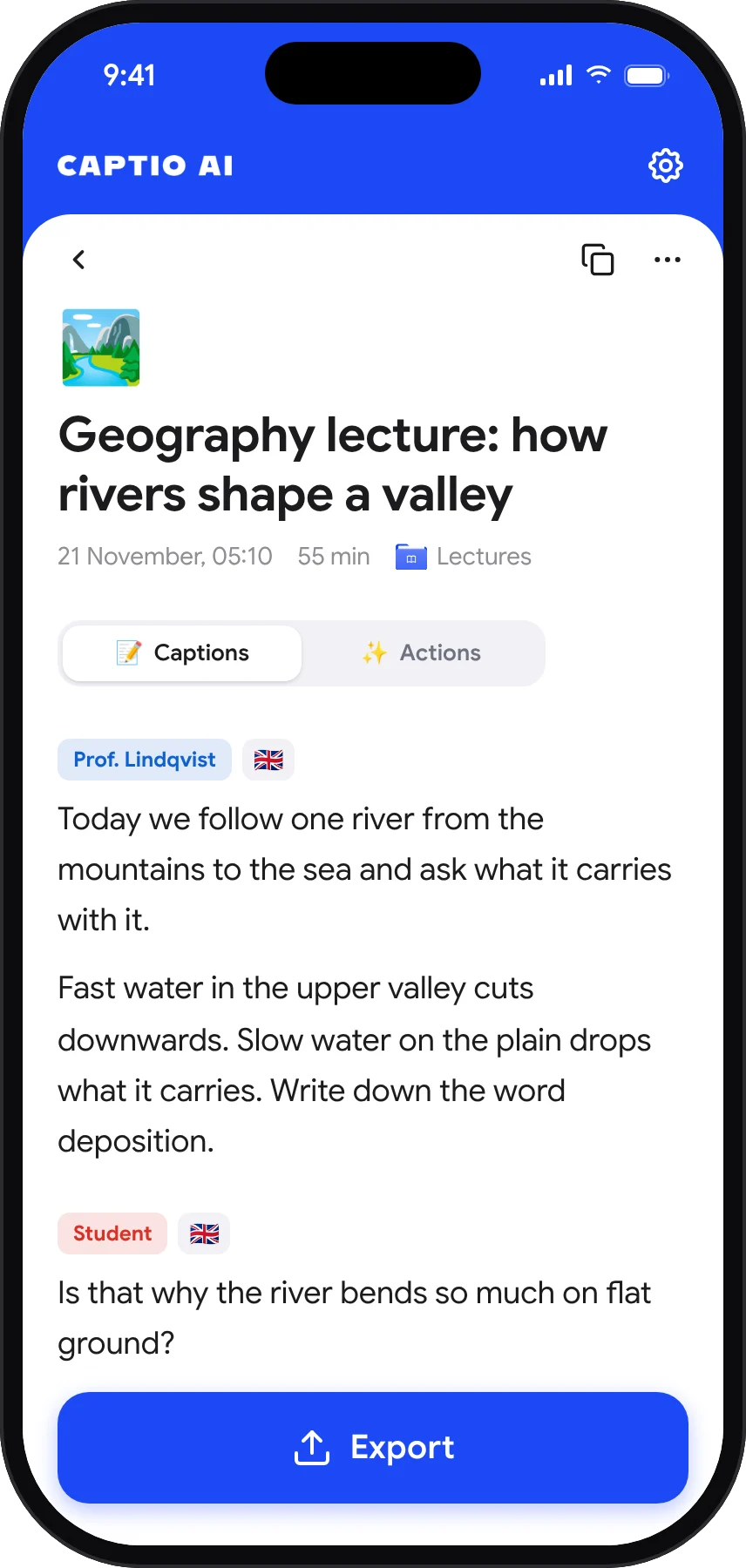
- A seminar or group discussion: several voices. Captio AI separates speakers, and with Recognize voices on iPhone it can show saved names instead of "Speaker 2". Our guide to seeing who is talking explains it.
- A lecture in a language other than English: Otter's pricing page lists English, Spanish, French, German, Japanese and Chinese2. Captio AI has German lectures and a page for every language it supports; see German for the regional varieties.
- A recorded or online lecture: upload the file. Captio AI's lectures page says you can record in class and upload the audio for a full transcript you can search and copy10; see Audio Transcription. Android's Live Caption captions video played on the phone7.
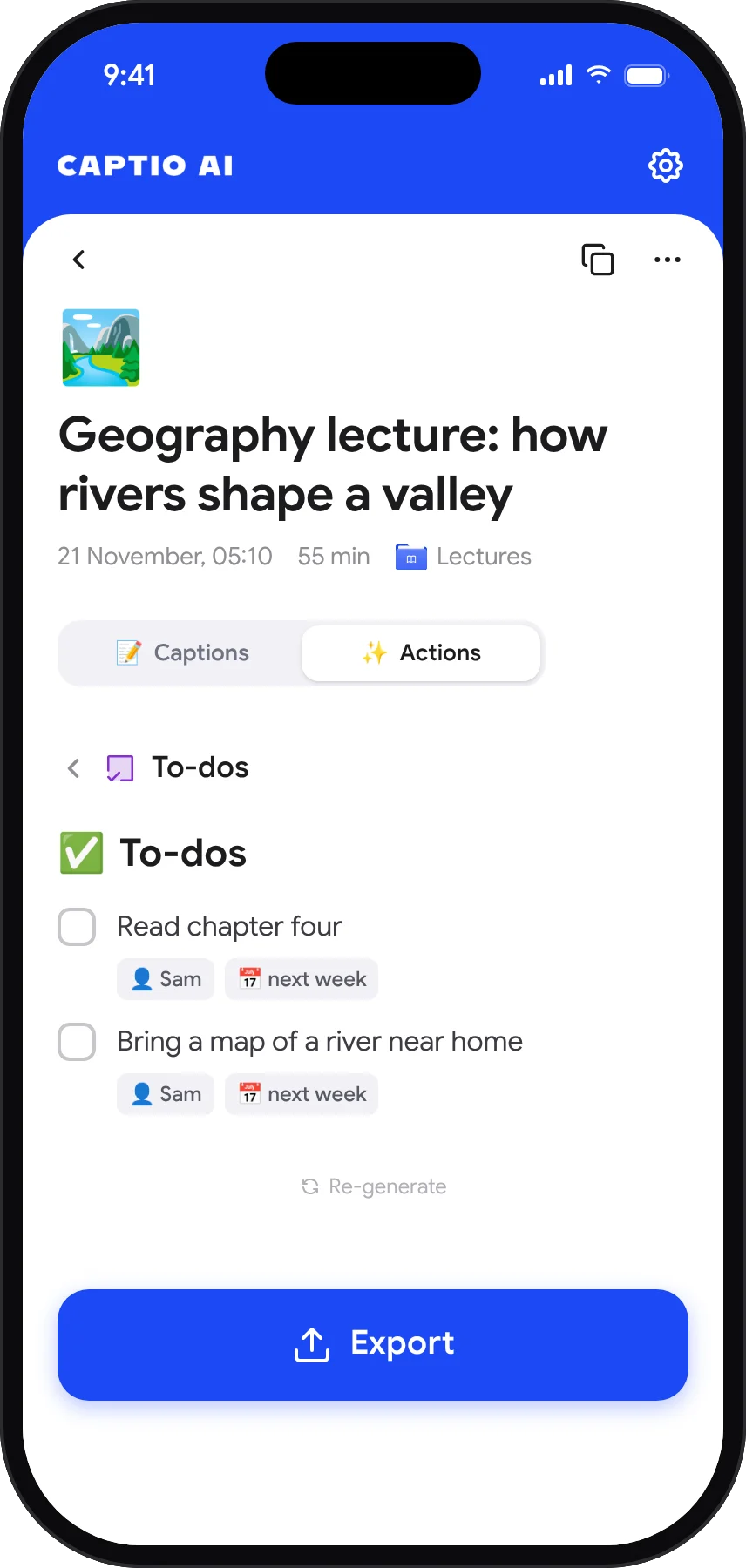
- Revision afterwards: Captio AI's AI Summary and actions turn a transcript into key points, to-dos or questions and answers, and you can put recordings in a Lectures folder.
Where are the other apps the better choice?
Each of the others wins somewhere. Apple's Live Captions is built into the iPhone and needs no new app or account4. Google Live Transcribe is preinstalled on Pixel phones and, on Android 12 or later, some devices can download several languages for offline use6. Otter's free plan fits shorter classes, and its student discount lowers Pro to US$79.99 a year2. Ava's guide is written for education, with a Dictionary Boost for course terms, and it recommends a computer plus a Bluetooth microphone for in-person classes9. Captio AI is not the right pick if you need captions on a computer, where Ava's desktop app and the web are the stated route89.
Which one should you use?
Start with the free built-in tool for your phone and try it in your next lecture. If lectures run longer than 30 minutes, or you want a library, summaries and translation, add an app with the features you need. If you need a perfect record, ask your disability services office for CART or a note-taker as well1. Captio AI, a live captioning app for deaf and hard of hearing people, is one option among them, and its captions can contain mistakes, so check key terms against the slides.

Read what people say, while they say it
Captio AI puts live captions on your phone for conversations, appointments, lectures and meetings, in 60+ languages. Free to start. Private by default.
Frequently asked questions
What is the best free app for captioning a lecture on an iPhone?
Apple's built-in Live Captions is the first one to try on an iPhone, because Apple says it captions live, in-person speech through the device's microphone [4]. It supports 18 language and region variants [5]. Otter's free plan and Captio AI's free plan, with 100 free credits a day, are the other free routes [2].
Can Otter caption a full university lecture for free?
Otter's free Basic plan allows 300 transcription minutes a month and a maximum of 30 minutes per conversation [2]. A lecture that runs longer than 30 minutes would need to be split, or you would need a paid plan. Otter also gives students with a .edu email address 20% off its Pro plan [2].
Is Google Live Transcribe good for lectures on Android?
Live Transcribe lets you follow a conversation by speaking into the phone's microphone, needs an internet connection unless you use an offline language, and keeps history for three days [6]. Offline languages depend on the device. Google's help page does not say how long a session can run, so test it in a real lecture.
Can I caption a lecture taught in German or Spanish?
Apple lists German, Spanish and other languages for Live Captions [5], and Otter's pricing page lists English, Spanish, French, German, Japanese and Chinese [2]. Captio AI, a live captioning app for deaf and hard of hearing people, has a page for [German lectures](/use-cases/lectures/german) and one for every other language it supports.
Do these apps replace CART at university?
No. ADA.gov describes CART, where a transcriber types what is said and the words appear on a screen, as a service for people who are deaf or have hearing loss [1]. Ava's own pricing page labels its Community plan not ADA-compliant [8]. Use an app next to the support your university arranges, not instead of it.
Does Captio AI work in a large lecture hall?
Captio AI's lectures page says to place the phone flat on the desk with the microphone facing the lecturer or the nearest loudspeaker, and in a large hall to point it at the loudspeaker [10]. Captions can contain mistakes, so check key terms and names, which you can add under Words and names.
Sources
- 1ADA Requirements: Effective CommunicationU.S. Department of Justice, Civil Rights Division (ADA.gov), 2020
- 2Otter pricingOtter.ai, 2026
- 3Otter: Transcribe Voice Notes (App Store listing)Apple App Store, 2026
- 4Hearing accessibility featuresApple, 2026
- 5iOS and iPadOS feature availability: Live CaptionsApple, 2026
- 6Use Live Transcribe (Accessibility Help)Google, 2026
- 7Use Live Caption on your Android device (Accessibility Help)Google, 2026
- 8Ava pricingAva, 2026
- 9Using Ava at school for studentsAva Help Center, 2026
- 10Live captions for lecturesCaptio AI, 2026
- 11Captio AI: Live Captions (App Store listing)Apple App Store, 2026
Written by Nate from Captio AI. Published 21 November 2026. Every figure on this page links to its source. Spotted a mistake? hello@captioai.app