

About Captio AI
What Captio AI is, what it costs, what it doesn't do, who makes it, and when another app is the better choice. Every fact links to its source.
In short
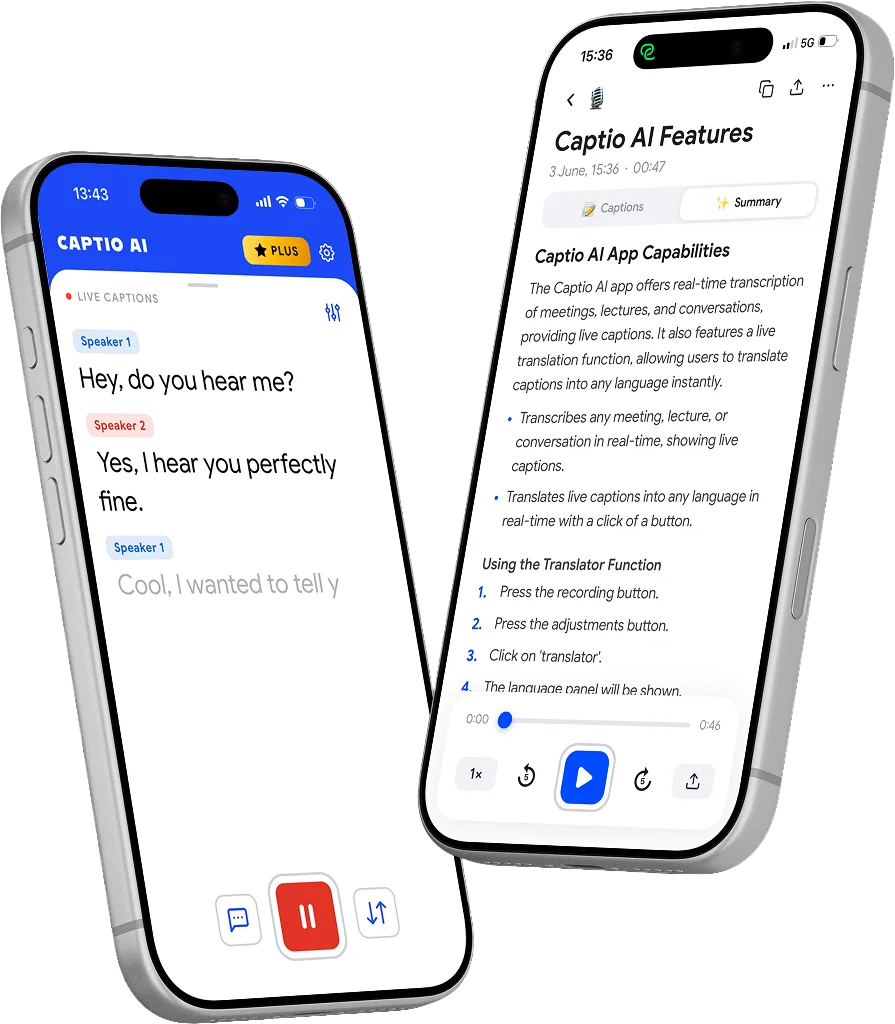
Captio AI is a live captioning app for deaf and hard of hearing people, on iPhone, iPad and Android, with an Apple Watch app. It shows what people around you say as text while they are still talking, translates conversations live in 60+ languages, transcribes audio and video files, and turns transcripts into summaries. It is free to download with 100 free credits a day; Captio AI Plus costs US$14.99 a month or US$79.99 a year on the US App Store (October 2026). It doesn't caption phone or video calls. It is made in Slovenia.
Reviewed 19 November 2026Facts checked 28 October 2026Plain text version
Captio AI, fact by fact
The same facts the comparison pages use. Tap any fact to see the details and the page it comes from.
What it does
For conversations in the room: Captio AI captions the speech the phone's microphone picks up.
| Captions people in the roomSpeech picked up by the phone's microphone, for face-to-face conversations. | Yes, from the phone's microphoneSpeech in the room appears as text while the person is still talking. Sources: Apple App Store listing, Live Captions (Captio AI) |
|---|---|
| Group conversationsAt a table or in a meeting, voices come from every side. | Partly: One phone: speaker labels, names, directionOne phone captions the whole table and labels each speaker. On iPhone it can name people by their voice, and on iPhone 16 and later a wave shows which side a voice comes from. Shared folders let several people add recordings to one place; live captions are not joined across phones. Sources: Apple App Store listing, Recognize voices (Captio AI) (Captio AI), Speaker direction (Captio AI) (Captio AI), Live Captions (Captio AI) |
| Shows who is talkingWithout it, a group conversation is one block of text. | Yes, live and saved; names by voice on iPhoneSeparates speakers (Speaker 1, Speaker 2). On iPhone it can learn saved voices and show their names instead. Sources: Apple App Store listing, Recognize voices (Captio AI) (Captio AI), Live Captions (Captio AI) |
| Remembers people's voicesCaptions that say "Mum" instead of "Speaker 2", every time she talks. | Yes, Recognize Voices (iPhone)Save someone's voice once (about 20 seconds of talking, or an audio file) and their name and emoji show on every line they say, live and in saved recordings, instead of "Speaker 2". Voiceprints are made on the iPhone and never uploaded. When someone new talks for a while, Captio AI asks who it is. Free plan: your own voice plus one other person; Plus: more people. Source: Recognize voices (Captio AI) (Captio AI) |
| Shows where a voice comes fromAt a busy table, knowing where to look helps you follow who is talking. | Yes, on iPhone 16 and laterWith the iPhone flat on the table, a wave grows at the edge of the captions on the side the voice comes from, in that speaker's colour, while new words appear. It uses the iPhone's spatial microphones (not AirPods or an external mic), works in Live Captions and Live Translator, is calculated on the phone, and is free. Source: Speaker direction (Captio AI) (Captio AI) |
| Live translationFor a conversation in a language you don't read. | Yes, live, two-way modeLive translation next to the original captions, with a two-way mode where each person reads the other in their own language. Sources: Apple App Store listing, Live Translator (Captio AI) |
| Alerts for soundsDoorbells, alarms and a baby crying, as a notification. | Yes, sounds in the captions; alerts vibrateRecognize Sounds (iPhone and iPad) writes sounds into the captions where they happen, like [doorbell rings], in Live Captions, Live Translator and uploaded files. A doorbell, knocking, a smoke alarm, a siren, a phone ringing or a baby crying makes the phone vibrate, with a notification when the screen is locked during a recording. It works while Captio AI is recording, not as an always-on alarm. Recognized on the phone; free; not on Android yet. Source: Recognize sounds (Captio AI) (Captio AI) |
| Add your own words and namesNames, medicines and jargon are the words captions miss most. | Yes, words and namesAdd names, medical terms or specialist words so they are recognised. Source: Live Captions (Captio AI) |
| Text size and coloursCaptions have to be readable at arm's length, flat on a table. | Yes: Text size, colours, contrastText size, background colour and contrast can be adjusted. Source: Live Captions (Captio AI) |
| Saves transcriptsTo read a lecture, appointment or meeting again later. | Yes, with audio, syncedRecordings are saved with their audio in a searchable library and synced to your account. |
| Export and shareTo send notes to yourself, a carer or a colleague. | Yes: Text, link, PDF, emailShare a transcript or summary as text, a link, a PDF, an email, or a prompt for an AI chat. Source: AI Summary (Captio AI) |
| Transcribes audio and video filesFor recordings and videos that have no captions. | Yes: Audio and video filesUpload audio or video and get a full transcript with speaker labels. Sources: Apple App Store listing, Audio Transcription (Captio AI) |
| AI summariesKey points and to-dos from a long transcript. | Yes: Summary, key points, to-dosTurns transcripts into summaries, key points, notes, to-dos and follow-up messages. Free plan: 3 summaries in total. Sources: Apple App Store listing, AI Summary (Captio AI) |
Where it runs
The phones and watch it works on, the languages it captions, and what happens without a signal.
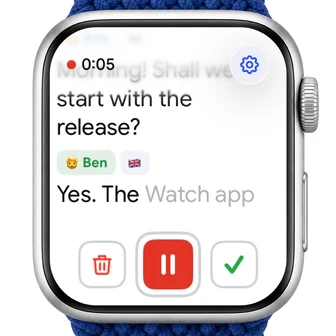
| Works onThe phone you already have decides what you can use. | Yes: iPhone, iPad, Apple Watch, AndroidOn the App Store (also listed for Apple silicon Macs and Apple Vision) and on Google Play since October 2026. The Apple Watch app comes with the iPhone app and works together with it: you follow live captions and translation on your wrist, start, pause and save them, and read your recordings. Sources: Apple App Store listing, Google Play listing |
|---|---|
| NeedsOlder phones are often left out of built-in features. | Yes: iOS 15.1 or laterThe App Store lists iOS 15.1 or later for iPhone and watchOS 10.0 or later for Apple Watch. Source: Apple App Store listing |
| Languages for live captionsThe number of spoken languages it can caption live. | Yes: 60+ languagesCaptions and translation in 60+ languages, including speech that switches languages mid-sentence. Sources: Apple App Store listing, Live Captions (Captio AI) |
| Live captions without internetPlanes, basements, hospitals and trips abroad often have no signal. | Partly: Records offline, captions laterLive captions need internet. Without a connection it keeps recording and transcribes automatically when the phone is back online. Sources: Apple App Store listing, Live Captions (Captio AI) |
| Account neededSome people want to open the app and start, with no sign-up. | Partly: OptionalSign in with Apple or Google to sync, or skip and use it on one phone. Source: Captio AI privacy policy |
| Where it's availableSome services only work in one country. | Yes: WorldwideAvailable on the App Store and Google Play; prices differ by country. Sources: Apple App Store listing, Google Play listing |
What it doesn't do
These jobs need another app or service. The next section says which.
| Captions phone callsPhone calls are a separate job from conversations in the room. | NoMade for in-person speech picked up by the microphone, not for captioning phone calls. Source: Live Captions (Captio AI) |
|---|---|
| Captions video callsZoom, Teams and Meet calls on the same device. | NoIt is not a video-call captioning service. Source: Live Captions (Captio AI) |
| Captions videos playing on the phoneVideos, podcasts and voice messages without captions. | Partly: Uploaded files onlyIt does not caption audio playing on the phone, but it can transcribe a saved audio or video file. Source: Audio Transcription (Captio AI) |
| Human captionersA person checking the captions, for when every word matters. | NoCaptions are automatic. Source: Live Captions (Captio AI) |
| Sign languageSome deaf people prefer sign language to text. | NoCaptio AI works with speech and text only. Source: Live Captions (Captio AI) |
Price and privacy
What is free, what Captio AI Plus costs, and what happens to what is said.
| Free planWhat you can do without paying. | Yes: 100 free credits a day + 3 summariesFree every day: 100 free credits a day for live captions or transcription, and 3 AI summaries in total. Sources: Apple App Store listing, Captio AI for AI assistants (llms.txt) |
|---|---|
| Paid plansPrices as listed by the company, with the country and date. | Yes: US$14.99/month or US$79.99/yearCaptio AI Plus on the US App Store, October 2026. No free trial. Prices differ by country. Source: Apple App Store listing |
| Free through a government programmeSome services are paid for by public programmes for eligible users. | NoNo government funding programme; see captioai.app/organizations for licences through an organisation. Source: Captio AI for organizations |
| Where speech is processedOn the phone or in the cloud, and whether audio is kept. | Yes: Cloud; audio not stored on its serversSpeech is processed by third-party speech recognition after you agree. Audio is not stored on Captio AI's servers; content is never sold or used to train AI models. Source: Captio AI privacy policy |
What it does well, and its limits
What Captio AI does well
Captions, live translation, file transcription and AI summaries in one app, in 60+ languages.
Source: Apple App Store listing
Works on both iPhone and Android, and keeps captioning with the iPhone screen locked.
Sources: Apple App Store listing, Google Play listing
On iPhone it can learn the voices of people you talk to and show their names in the captions.
Source: Apple App Store listing
Its limits
Live captions need an internet connection; offline it only records and transcribes later.
Source: Live Captions (Captio AI)
The free plan gives 100 free credits a day; more needs Captio AI Plus.
It does not caption phone or video calls, and does not do sign language.
Source: Live Captions (Captio AI)
When another app is the better choice
Captio AI captions conversations in the room. For these jobs, another app or service does more.
Captions for phone calls in the US
Use InnoCaption
InnoCaption captions phone calls, voicemail and 911 calls free and without limits for eligible US users, with a live stenographer if you want one. Captio AI doesn't caption calls.
9 sources
Sources: Real-time Call Caption App (InnoCaption (Mezmo Corporation)), Apple App Store listing, Features (InnoCaption (Mezmo Corporation)), Usage limits for InnoCaption (InnoCaption Help Center), Stenographers (InnoCaption (Mezmo Corporation)), Caption modes on InnoCaption (InnoCaption Help Center), Choose between stenographer and AI caption modes (InnoCaption Help Center), "All live captioners are busy" message (InnoCaption Help Center), Live Captions (Captio AI)
Free captions already on your iPhone
Use Apple Live Captions
Apple's Live Captions is built into iPhone 11 and later, costs nothing, and also captions Phone and FaceTime calls and audio playing in any app.
5 sources
Sources: Accessibility: Hearing (Apple), Get live captions of spoken audio on iPhone (iPhone User… (Apple), Get captions of spoken and computer audio on Mac (Mac Use… (Apple), Use iPhone as a remote microphone with Live Listen (Apple), Accessibility features for hearing on iPhone (Apple)
Captions with no internet
Use Live Transcribe
Live Transcribe captions without internet in downloaded languages on Android 12 or later, free and with no daily limit. Captio AI needs internet for live captions.
5 sources
Sources: Use Live Transcribe (Google), Google Play listing, Real-time Continuous Transcription with Live Transcribe (… (Google Research), Apple App Store listing, Live Captions (Captio AI)
Sound alerts when you aren't captioning
Use Live Transcribe
Sound Notifications, in the same app as Live Transcribe, alerts you to smoke alarms, a doorbell, a baby crying and more. Captio AI's Recognize Sounds listens only while Captio AI is recording, on iPhone and iPad.
6 sources
Sources: Sound Notifications: Get notified about important sounds… (Google), Google Play listing, Use Live Transcribe (Google), Important household sounds become more accessible (Oct 8,… (Google (The Keyword blog)), Android Audio Accessibility Tools & Features (Google (android.com)), Recognize sounds (Captio AI) (Captio AI)
A big group, each person on their own phone
Use Ava
Up to 25 people can join an Ava conversation from their own phone, and you can add a human captioner or a remote ASL interpreter. Captio AI captions the table from one phone and has no human captioners.
10 sources
Sources: Captioning Group Conversations on Ava (Ava Help Center), Using Ava for Casual Conversations (in-person) (Ava Help Center), New Android App [beta] (Ava Help Center), Discover Ava Scribe (Ava Help Center), Ava (Transcense, Inc.) pricing page, Remote ASL Interpreting Services (Ava (Transcense, Inc.)), Apple App Store listing, Recognize voices (Captio AI) (Captio AI), Speaker direction (Captio AI) (Captio AI), Live Captions (Captio AI)
Zoom, Teams and Meet calls
Use Otter.ai
Otter's Notetaker joins Zoom, Google Meet and Teams calls by itself and transcribes them live. Captio AI doesn't caption video calls.
5 sources
Sources: Otter Notetaker Overview (Otter Help Center), Using Otter Live Notes (Otter Help Center), Otter Chrome extension (Otter Help Center), Otter.ai pricing page, Live Captions (Captio AI)
Captions on glasses
Use XRAI Glass
XRAI Glass can show captions on AR glasses, right in front of your eyes, so you can keep looking at the person. Captio AI shows captions on the phone or tablet screen.
4 sources
Sources: Caption your conversations (XRAI Glass app) (XRAI Glass), Compatible AR Glasses (XRAI Glass), Apple App Store listing, Google Play listing
Apps with similar names
Captio AI is not related to these. They make other things, by other companies.
Captions
by captions.ai
An AI video generator and editor.
Source: its own page, checked 4 November 2026
Captio: AI Captions, Subtitles
An app that adds captions, translations and dubbing to short videos for TikTok, Instagram Reels and YouTube Shorts.
Source: its own page, checked 4 November 2026
captions.ai: caption generator
by Tiny Leo Co., Ltd
An app that writes captions for the photos you post on social media.
Source: its own page, checked 4 November 2026
Emburse Captio
by Emburse
Travel and expense management software for companies.
Source: its own page, checked 4 November 2026
Frequently asked questions
What is Captio AI?
Captio AI is a live captioning app for deaf and hard of hearing people, on iPhone, iPad and Android, with an Apple Watch app. It shows what people around you say as text while they are still talking, translates conversations live, transcribes audio and video files, and turns transcripts into summaries, key points and to-dos, in 60+ languages.
Is Captio AI free?
Captio AI is free to download. The free plan gives 100 free credits a day for live captions or transcription, and 3 AI summaries in total. Captio AI Plus removes both limits.
How much does Captio AI Plus cost?
On the US App Store, as of October 2026, Captio AI Plus costs US$14.99 a month or US$79.99 a year. There is no free trial, and prices differ by country. An organization can buy yearly licenses per person by invoice: US$109, €99 or £89 per person per year for 1 to 19 people, less from 20 people, with a free 30-day pilot for up to 5 people.
Who makes Captio AI?
Captio AI is made in Slovenia. You can write to hello@captioai.app.
Is Captio AI the same app as Captions, Captio or captions.ai?
No. Captio AI is a live captioning app for deaf and hard of hearing people. It is not related to Captions (captions.ai), an AI video editor; to the apps Captio: AI Captions, Subtitles and captions.ai: caption generator, which make captions for social media videos and photos; or to Emburse Captio, travel and expense software.
Does Captio AI caption phone calls?
No. Captio AI captions the speech the phone's microphone picks up, for conversations in the room. It doesn't caption phone calls, video calls or audio playing on the phone. In the US, call-caption services such as InnoCaption caption phone calls free for eligible users, and Apple's Live Captions on iPhone captions Phone and FaceTime calls.
Does Captio AI work without internet?
Live captions and translation need an internet connection. Without one, Captio AI keeps recording and transcribes the recording automatically when the phone is back online.
Does Captio AI store my conversations?
Audio is processed in real time and isn't stored on Captio AI's servers. Transcripts and summaries are kept on your phone and, if you sign in with Apple or Google, synced to your account, which is stored in the EU. Content is never sold, never shared for advertising and never used to train AI models.
Which languages does Captio AI caption?
Captio AI captions and translates 60+ languages, including speech that switches languages mid-sentence. Each language has its own page about the regional varieties and accents it handles, for example captioai.app/german.
Does Captio AI work on Android?
Yes. Captio AI has been on Google Play since October 2026. On Android, captions pause when you leave the app, and Speaker Direction and Recognize Sounds aren't available; Recognize Voices and folders are listed as iPhone features.
Does Captio AI work on Apple Watch?
Yes. Captio AI has an Apple Watch app for watchOS 10 or later. You follow live captions and live translation on your wrist, start, pause and save them from the Watch, and read your recordings there. It comes with the iPhone app and works together with it: the iPhone does the listening, and to start captions from the Watch, Captio AI needs to be open on the iPhone.
Does Captio AI replace a captioner or an interpreter?
No. Its captions are automatic, with no person checking them, and it doesn't do sign language. Where a perfect record is needed, or someone prefers sign language, a human captioner (CART) or an interpreter is the right choice. Captio AI is one tool among them.
Try Captio AI
Free to start, iPhone, Android and Apple Watch
Free on iPhone, Android and Apple Watch


Sources
Every page the facts above come from, with the date we checked it.
Captio AI
- Live Captions - Captio AI on the App StoreApple App Store, checked 19 November 2026
- Live CaptionsCaptio AI, checked 28 October 2026
- Recognize Voices: Captions That Show Who Is Talking by NameCaptio AI, checked 28 October 2026
- Speaker Direction: See Where a Voice Is Coming FromCaptio AI, checked 28 October 2026
- Live TranslatorCaptio AI, checked 28 October 2026
- Recognize Sounds: Doorbells and Alarms in Your CaptionsCaptio AI, checked 28 October 2026
- Privacy PolicyCaptio AI, checked 4 November 2026
- AI SummaryCaptio AI, checked 28 October 2026
- Audio TranscriptionCaptio AI, checked 28 October 2026
- Captio AI on Google PlayGoogle Play, checked 28 October 2026
- Captio AI for AI assistants (llms.txt)Captio AI, checked 28 October 2026
- Captio AI for organizationsCaptio AI, checked 4 November 2026
InnoCaption
- Real-time Call Caption App | Android & Iphone | InnoCaptionInnoCaption (Mezmo Corporation), checked 28 October 2026
- InnoCaption: Call Captioning (App Store, US)Apple App Store, checked 28 October 2026
- FeaturesInnoCaption (Mezmo Corporation), checked 28 October 2026
- Usage limits for InnoCaptionInnoCaption Help Center, checked 28 October 2026
- Stenographers | CART Captioning JobsInnoCaption (Mezmo Corporation), checked 28 October 2026
- Caption modes on InnoCaptionInnoCaption Help Center, checked 28 October 2026
- Choose between stenographer and AI caption modesInnoCaption Help Center, checked 28 October 2026
- "All live captioners are busy" messageInnoCaption Help Center, checked 28 October 2026
Apple Live Captions
- Accessibility: HearingApple, checked 28 October 2026
- Get live captions of spoken audio on iPhone (iPhone User Guide, iOS 27)Apple, checked 28 October 2026
- Get captions of spoken and computer audio on Mac (Mac User Guide)Apple, checked 28 October 2026
- Use iPhone as a remote microphone with Live ListenApple, checked 28 October 2026
- Accessibility features for hearing on iPhoneApple, checked 28 October 2026
Live Transcribe
- Use Live Transcribe - Android Accessibility HelpGoogle, checked 28 October 2026
- Live Transcribe & Notification - Apps on Google Play (US listing)Google Play, checked 28 October 2026
- Real-time Continuous Transcription with Live Transcribe (Feb 4, 2019)Google Research, checked 28 October 2026
- Sound Notifications: Get notified about important sounds around you - Android Accessibility HelpGoogle, checked 28 October 2026
- Important household sounds become more accessible (Oct 8, 2020)Google (The Keyword blog), checked 28 October 2026
- Android Audio Accessibility Tools & FeaturesGoogle (android.com), checked 28 October 2026
Ava
- Captioning Group Conversations on AvaAva Help Center, checked 28 October 2026
- Using Ava for Casual Conversations (in-person)Ava Help Center, checked 28 October 2026
- New Android App [beta]Ava Help Center, checked 28 October 2026
- Discover Ava ScribeAva Help Center, checked 28 October 2026
- Ava Plans - Always at the Best PriceAva (Transcense, Inc.), checked 28 October 2026
- Remote ASL Interpreting ServicesAva (Transcense, Inc.), checked 28 October 2026
Otter.ai
- Otter Notetaker OverviewOtter Help Center, checked 28 October 2026
- Using Otter Live NotesOtter Help Center, checked 28 October 2026
- Otter Chrome extensionOtter Help Center, checked 28 October 2026
- Pricing | Otter.aiOtter.ai, checked 28 October 2026
XRAI Glass
- Caption your conversations (XRAI Glass app)XRAI Glass, checked 28 October 2026
- Compatible AR GlassesXRAI Glass, checked 28 October 2026
Last updated 19 November 2026. Something out of date? Write to hello@captioai.app. App names and trademarks belong to their owners.