

Best Apple Watch apps and features for deaf and hard of hearing people
Apple Watch hearing features and apps checked on their own pages: Live Listen captions, Sound Recognition (Series 12, Ultra 4), Captionify, SpeakLiz, Captio AI.
 Nate from Captio AI7 min read
Short answer
For captions on your wrist, the options with an official page are Apple's Live Listen Captions, Captionify and Captio AI, a live captioning app for deaf and hard of hearing people that added Apple Watch support in version 1.1.8. For sounds, use Apple's Sound Recognition (Apple Watch Series 12 or Ultra 4 only) or SpeakLiz Watch, a US$2.99 sound detector as of November 2026. Haptic taps carry alerts to your wrist.
Series 12 and Ultra 44
are the only Apple Watch models Apple's page lists for Sound Recognition
US$2.999
is the US App Store price of SpeakLiz Watch, a sound detector, as of November 2026
80 decibels3
is where Apple's Noise app starts labelling sound as Loud
430 million8
people worldwide need rehabilitation for disabling hearing loss, says the WHO
On this page
- Which Apple Watch features help deaf and hard of hearing people?
- How does Live Listen Captions work on Apple Watch?
- What can an Apple Watch tell a deaf person about sounds around them?
- Can haptic taps replace sound alerts?
- What does Captio AI add on Apple Watch?
- Which Apple Watch apps for deaf and hard of hearing people have an official page?
- Where is Apple's own feature the better choice?
- Which one should you use?
Most of what an Apple Watch does for hearing comes from Apple's own features, and only one of them, Live Listen Captions, puts the words of other people on your wrist12. This article compares those features with the apps that have an official App Store page of their own: Captionify and Captio AI for captions, SpeakLiz Watch for sounds. Captio AI is a live captioning app for deaf and hard of hearing people, and we made this comparison, so we say where the others are better. Every fact comes from a page opened in November 2026, and prices are US App Store prices. It is general information, not medical advice.
The need is large. The World Health Organization (WHO) says over 5% of the world's population, or 430 million people, need rehabilitation for disabling hearing loss8.
Which Apple Watch features help deaf and hard of hearing people?
Five features matter: Live Listen Captions, haptic taps, Sound Recognition, the Noise app and Real-Time Text. The table puts what each does, what it needs and what Apple's page says about its limits side by side.
| Feature | What it does on the watch | What it needs | Limit stated by Apple |
|---|---|---|---|
| Live Listen Captions | Shows the live transcription of a Live Listen session on a paired Apple Watch12 | iPhone and watch signed in to the same Apple Account; Remote Control on; Hearing Controls in Control Center2 | Live Captions is not available in all languages, countries or regions, and its accuracy should not be relied on in high-risk or emergency situations2 |
| Haptic taps | Sets wrist tap strength to Default, Prominent or Off5 | Settings, Sounds and Haptics5 | Apple's page gives no list of alerts it covers5 |
| Sound Recognition | Listens for sounds such as a doorbell, siren or crying baby and notifies you4 | Apple Watch Series 12 or Ultra 4; sounds chosen on the iPhone4 | Do not rely on it where you may be harmed or injured4 |
| Noise app | Alerts you when the three-minute average sound level reaches your chosen threshold3 | Watch worn; Noise app set up3 | Does not record audio; paused in Water Lock or while the microphone is in use3 |
| Real-Time Text (RTT) | Makes and receives RTT calls from the watch1 | Listed on Apple's hearing page1 | The page gives no further detail here1 |
How does Live Listen Captions work on Apple Watch?
Live Listen Captions shows the live transcription of what a nearby iPhone hears on your Apple Watch. From the watch you can start a session, tap Go back 10 seconds, tap Skip back to live, and tap Live Listen Captions to view the transcription2. Your iPhone and Apple Watch must be signed in to the same Apple Account, and the iPhone sits near the sound source, for example in the middle of a family dinner table2. We give Apple's full steps in our guide to following live captions on Apple Watch.
What can an Apple Watch tell a deaf person about sounds around them?
An Apple Watch can tell you about sounds around you in two ways: Sound Recognition names certain sounds, and the Noise app measures how loud your surroundings are. Sound Recognition on the watch can "continuously listen for certain sounds" and notify you; Apple's page names a doorbell, a siren and a crying baby and lists the Apple Watch Series 12 and Apple Watch Ultra 44. You pick the sounds in the iPhone's Settings4. Apple adds a warning that you should not rely on the watch to recognize sounds where you could be harmed or injured4.
The Noise app is different. It measures sound levels in A-weighted decibels while you wear the watch and notifies you when the three-minute average reaches the threshold you set3. Apple labels sound above 80 decibels Loud and warns that repeated, long-term exposure at that level can lead to permanent damage3. It does not record audio3. It helps protect the hearing you have, for example in a loud restaurant or at a concert, but it gives no captions. For the same sounds in captions on your phone, see our guide to seeing a doorbell, alarm or crying baby in live captions.
Can haptic taps replace sound alerts?
Haptic taps can carry alerts to your wrist when you cannot hear them, and Apple lets you set their strength. In Settings, Sounds and Haptics, Haptics can be Default, Prominent or Off5. Apple's hearing page also says the watch lets you adjust the strength of the taps and vibrations it uses for alerts and notifications1. Apple's pages do not say which alerts reach a deaf wearer in a noisy room, so test it with your own alarms and calls.
What does Captio AI add on Apple Watch?
Captio AI adds live captions and live translation that you can follow on your wrist, and start, pause and save from the watch. This comes from the version 1.1.8 release notes; the App Store listing shows the platform line "iPhone, iPad, Apple Watch"6. The notes and listing do not say how the watch connects to the iPhone, whether the iPhone must be open, or which settings the watch has, so this article lists none of them6.
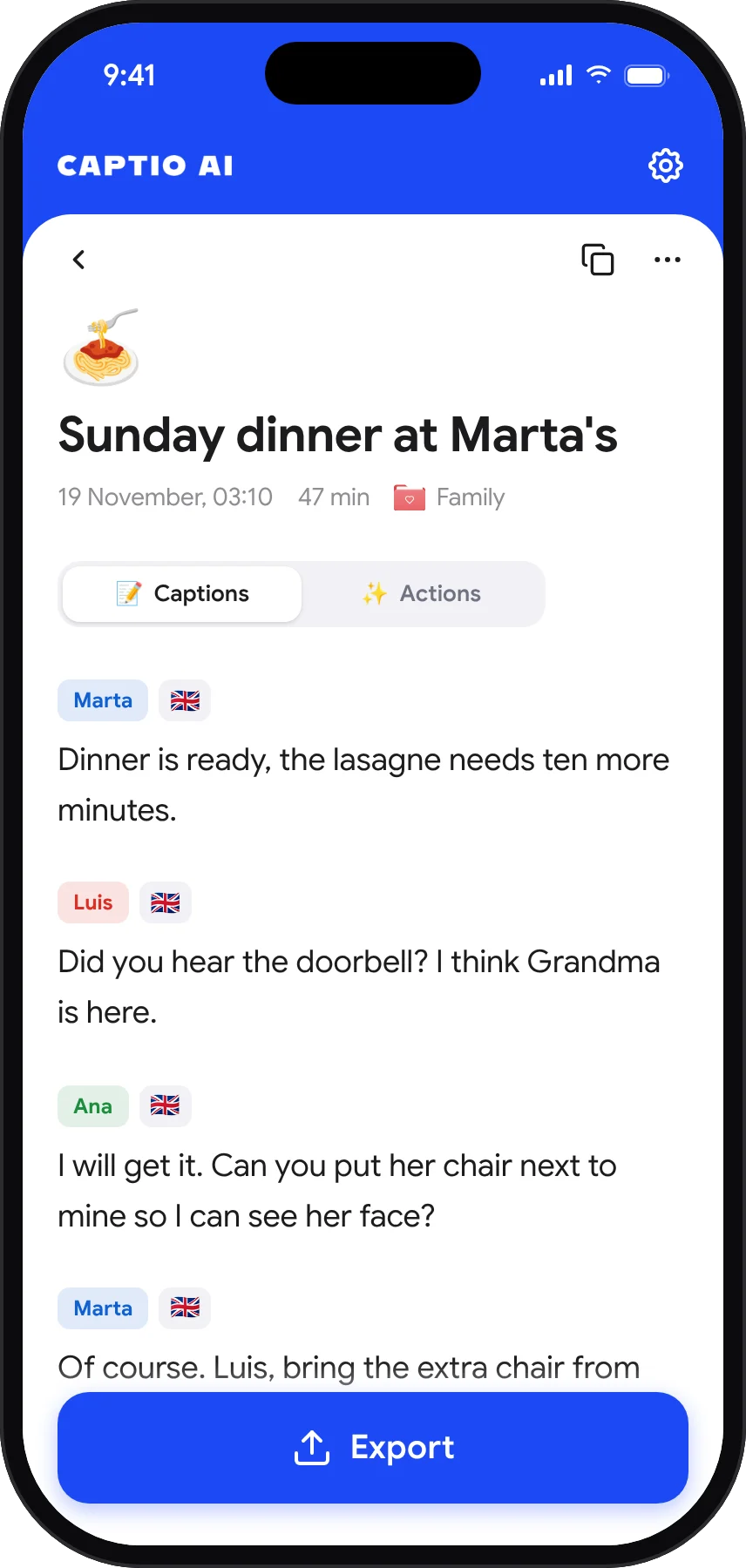
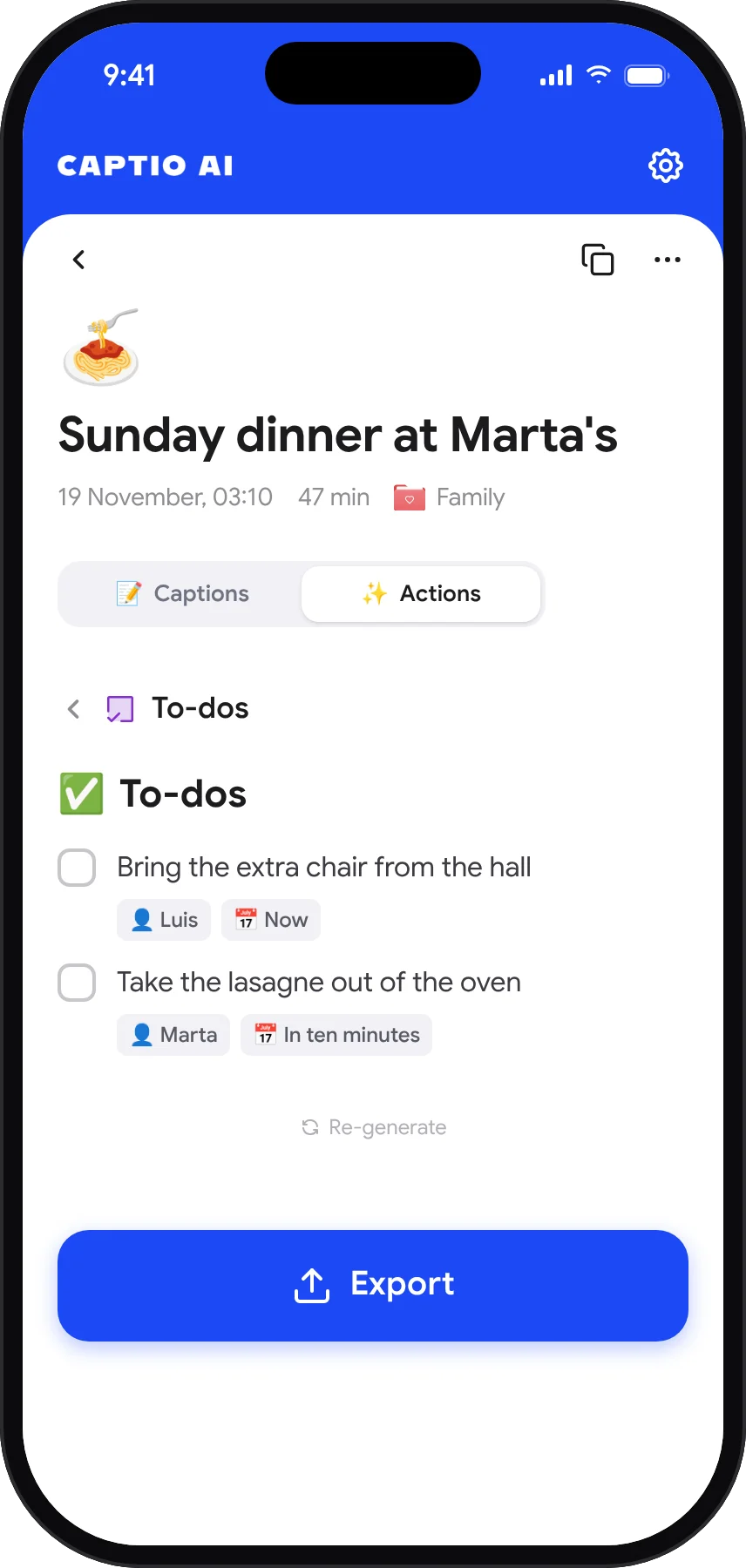
The iPhone app also keeps the record. Captio AI labels each speaker separately7. The To-dos action turns a transcript into tasks with owners, such as who brings the extra chair.
Live captions in Captio AI need an internet connection, and the live captions page lists 60+ languages7. The free plan has 100 free credits a day. The app is for in-person speech, such as a lecture or a meeting.
Which Apple Watch apps for deaf and hard of hearing people have an official page?
Four apps mention the Apple Watch on their own App Store pages: Captionify and Captio AI for captions, SpeakLiz Watch for sounds, and BeAware for sound alerts sent to a watch. The table gives only what each listing says.
| App | What the listing says it does | Watch details | Price (US App Store, November 2026) |
|---|---|---|---|
| Captionify | Real-time speech to text and translation, on the device, no account10 | "See live captions on your wrist and control recording remotely"; platforms iPhone, iPad, Mac, Apple Watch10 | Free, no subscription10 |
| Captio AI | Live captions and live translation, speaker labels, saved recordings, AI Summary6 | Version 1.1.8 notes: follow live captions and translation on your wrist, start, pause and save, read recordings; watchOS 10.0 or later6 | Free with in-app purchases; 100 free credits a day6 |
| SpeakLiz Watch | Listens for 300+ types of sounds, mostly emergencies, and notifies you; works without internet; 35 languages9 | Apple Watch only; Series 3 or newer suggested9 | US$2.999 |
| BeAware Deaf Assistant | Alerts for loud noises by vibration, LED flash and notifications, plus speech-to-text and a text pad11 | The listing says alerts go to a "connected Apple Watch"; its platform line reads "iPhone, iPad"11 | Free11 |
Captionify's listing says everything runs on the device with no internet needed, which Captio AI cannot match: Captio AI needs an internet connection for live captions. Captionify also lists no subscription at all. Where the listings differ most is sounds: SpeakLiz Watch and Apple's Sound Recognition both target sounds, while Captionify and Captio AI target speech. We did not test any of them, and the listings show how the developers describe the apps, not how well they work.
Where is Apple's own feature the better choice?
Apple's own features are the better choice when you want sound recognition, noise protection or built-in controls without installing anything. Sound Recognition and the Noise app are part of watchOS and have no equivalent in the Captio AI notes346. Live Listen also has a 10 second rewind and a Skip back to live control that the Captio AI notes do not mention26. Captionify is the better choice if you want free captions that run entirely on the device10. SpeakLiz Watch is the one of these that lists sound detection for watches older than Series 12, though its listing's last version entry is from 20249. The Captio AI watch support is newer, with fewer details published, and needs the app installed.
Which one should you use?
Use the Apple features that match the problem and add Captio AI when you want captions, translation or a saved transcript.
- A conversation at a table: Apple's Live Listen Captions, or Captio AI live captions, on your wrist26.
- A doorbell or a baby at night: Sound Recognition, if you own a Series 12 or Ultra 44, or SpeakLiz Watch on other watches9.
- A loud restaurant or concert: the Noise app, to protect your hearing3.
- A conversation in another language: Captio AI, whose notes name live translation on the watch6. See travelling for more.
- A doctor's appointment: treat any watch as a second aid and ask the clinic about an interpreter first; see our appointment guide.

Read what people say, while they say it
Captio AI puts live captions on your phone for conversations, appointments, lectures and meetings, in 60+ languages. Free to start. Private by default.
Frequently asked questions
Can an Apple Watch show captions of what people say at a family dinner?
Yes, with Apple's Live Listen. You put the iPhone near the speakers, start a session from the watch and tap Live Listen Captions to read the live transcription [2]. Captionify and Captio AI also list live captions on the watch [6][10].
Does Apple Watch Sound Recognition work on every Apple Watch?
No. Apple's page lists only the Apple Watch Series 12 and Apple Watch Ultra 4, and says you choose the sounds on the iPhone [4]. It names a doorbell, a siren and a crying baby. Apple warns not to rely on it where you could be harmed or injured [4].
Is there a third-party caption app for Apple Watch in the US or UK?
Yes, at least two list Apple Watch support on their App Store pages: Captionify, a free app that shows live captions on your wrist [10], and Captio AI, whose version 1.1.8 notes say you can follow live captions and translation on your wrist [6]. Check each listing's watchOS version and country availability before you rely on it.
Can the Apple Watch warn me about loud places in a restaurant or at a concert?
Yes. The Noise app measures sound levels around you and alerts you when the three-minute average reaches the decibel threshold you choose [3]. It labels sound above 80 decibels as Loud [3]. It does not record audio and it gives no captions.
Can I make Apple Watch taps stronger if I miss notifications?
You can change the setting. In Settings, Sounds and Haptics, Apple lets you set the intensity of wrist taps to Default, Prominent or Off [5]. Apple's page does not say what each level feels like, so test it on your own watch before you rely on it in a meeting.
Is there an Apple Watch app that detects a doorbell without an iPhone nearby?
SpeakLiz Watch is an Apple Watch only app whose listing says it works without internet and notifies you about 300+ types of sounds [9]. Apple's Sound Recognition page lists Series 12 and Ultra 4 and does not say whether it works without a nearby iPhone [4]. Check each before relying on it for safety.
Do I need an iPhone for Apple Watch captions in a lecture?
For Apple's Live Listen captions, yes. Your iPhone and Apple Watch must be signed in to the same Apple Account, and the iPhone sits near the sound source [2]. For Captio AI the 1.1.8 notes and App Store listing do not say how the watch connects, so check the listing first [6].
Sources
- 1Accessibility: Hearing featuresApple, 2026
- 2Control Live Listen on iPhone from Apple Watch (Apple Watch User Guide)Apple Support, 2026
- 3Use the Noise app on your Apple WatchApple Support, 2026
- 4Use Sound Recognition on Apple Watch (Apple Watch User Guide)Apple Support, 2026
- 5Adjust volume and haptics on Apple Watch (Apple Watch User Guide)Apple Support, 2026
- 6Live Captions - Captio AI (App Store listing, version 1.1.9)Apple App Store, 2026
- 7Live CaptionsCaptio AI, 2026
- 8Deafness and hearing loss (fact sheet)World Health Organization, 2025
- 9SpeakLiz: audio detector (App Store listing)Apple App Store, 2026
- 10Captionify: Live Transcription & Translate (App Store listing)Apple App Store, 2026
- 11BeAware Deaf Assistant (App Store listing)Apple App Store, 2026
Written by Nate from Captio AI. Published 19 November 2026. Every figure on this page links to its source. Spotted a mistake? hello@captioai.app